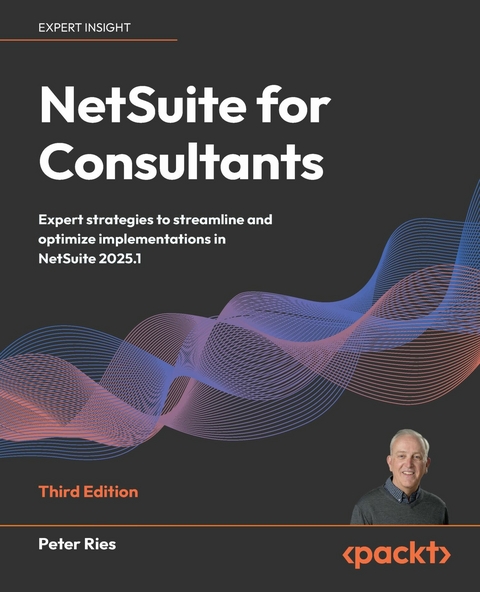
NetSuite for Consultants (eBook)
336 Seiten
Packt Publishing (Verlag)
978-1-83664-076-9 (ISBN)
NetSuite consultants face increasingly complex challenges in multi-currency configurations, financial automation, and third-party integrations that become maintenance nightmares. Add evolving client expectations and rapidly advancing platform capabilities, and many consultants find themselves struggling to deliver the transformative results their clients demand.
This comprehensive guide provides the up-to-date roadmap you need to master NetSuite implementation and customization, turning these persistent challenges into competitive advantages.
In this updated edition, author Peter Ries, an Oracle NetSuite Consulting Technical Director, expands on the latest advancements, including AI-enabled features, SuiteAnalytics, mobile apps, and new integration options. You'll gain access to proven consulting strategies, ERP optimization best practices, and practical guidance for configuring NetSuite to meet complex business requirements. Through real-world scenarios and actionable case studies, you'll learn how to navigate common pitfalls and implement scalable solutions that drive long-term success.
By the end of this book, you'll be fully prepared to streamline NetSuite implementations and deliver high-impact consulting services confidently. It's designed to maximize your career potential, no matter your level of experience.
Written by an Oracle Consulting Director, this guide covers the latest updates to help consultants tackle real-world challenges and build efficient, scalable solutions. Free with your book: PDF Copy, AI Assistant, and Next-Gen Reader.Key FeaturesLeverage expert consulting insights to implement and scale NetSuite for diverse business needsMaster advanced AI-enabled features, SuiteAnalytics, and integration techniques to automate business processesTackle real-world NetSuite challenges with proven solutions, case studies, and best practicesPurchase of the print or Kindle book includes a free PDF eBookBook DescriptionNetSuite consultants face increasingly complex challenges in multi-currency configurations, financial automation, and third-party integrations that become maintenance nightmares. Add evolving client expectations and rapidly advancing platform capabilities, and many consultants find themselves struggling to deliver the transformative results their clients demand. This comprehensive guide provides the up-to-date roadmap you need to master NetSuite implementation and customization, turning these persistent challenges into competitive advantages. In this updated edition, author Peter Ries, an Oracle NetSuite Consulting Technical Director, expands on the latest advancements, including AI-enabled features, SuiteAnalytics, mobile apps, and new integration options. You'll gain access to proven consulting strategies, ERP optimization best practices, and practical guidance for configuring NetSuite to meet complex business requirements. Through real-world scenarios and actionable case studies, you ll learn how to navigate common pitfalls and implement scalable solutions that drive long-term success. By the end of this book, you ll be fully prepared to streamline NetSuite implementations and deliver high-impact consulting services confidently. It s designed to maximize your career potential, no matter your level of experience.What you will learnMaster NetSuite implementation strategies tailored for various business needsAssess and translate business process requirements for any clientIdentify how and when to customize NetSuite solutions to automate processesIntegrate third-party systems with NetSuite for seamless operationsAnalyze business data using SuiteAnalytics for better decision-makingManage multi-subsidiary deployments and complex configurationsAvoid common pitfalls and overcome real-world implementation challengesApply best practices for performance optimization and scalabilityWho this book is forThis book is for NetSuite consultants, solution architects, and business analysts who want to streamline operations, automate repetitive tasks using Workflows and SuiteScripts, and scale their NetSuite instance to support growth and efficiency. Basic NetSuite knowledge is recommended to get the most out of this guide.]]>
Preface
NetSuite was created in 1998, in Northern California, from a desire to bring small- and medium-sized business processing into the internet age. A few people who worked for Oracle at the time wanted to create a Relationship Management (CRM) and Enterprise Resource Planning (ERP) product you could run in your web browser without ever having to install anything in your offices. They received seed money for this new company and embarked upon their 20+ year journey to making the set of products we use today.
I began working for NetSuite in 2012 as a technical consultant, delivering customizations and integrations for clients who were just about to go live on the platform. I’ve been working at that ever since, and one thing I’ve learned is that every business is unique and brings its own challenges when it comes to implementing NetSuite. At the same time, however, all companies share a few common traits when it comes to introducing them to the NetSuite line of products.
With this book, I hope to share what I’ve learned about helping clients use NetSuite. I’d like to think I can help make the process of getting a company up and running on NetSuite less painful and faster than it might otherwise be. I hope you find this useful and will engage with me and the rest of the NetSuite user community in online discussions regarding this topic.
Who this book is for
This book has two intended audiences. One is people who work for a company that helps other businesses implement NetSuite. We generally refer to those companies as NetSuite partners or vendors, or sometimes system integrators. They have lots of people on staff whose job is to work with NetSuite client companies and help them get started on the platform. These folks need to learn more about NetSuite and how to work with clients.
The other audience for this book is anyone working at a NetSuite client company who needs to help their users do more with the product – or maybe they’re considering whether they could self-implement without the help of a partner. This will always be a large, challenging task, but you might feel more confident about taking this on after reading this book.
What this book covers
Part 1: The NetSuite Ecosystem, Including the Main Modules, Platform, and Related Features
Chapter 1, Introduction to the NetSuite Ecosystem, Platform, and Related Features, starts with an explanation of what NetSuite is all about and what you can do with it.
Chapter 2, Selecting and Applying an Implementation Methodology, covers implementation project methods and how to select the right one for every client.
Chapter 3, Creating a Project Plan, discusses what a NetSuite implementation project consists of and how you can schedule your time.
Part 2: Understanding the Client’s Organization
Chapter 4, Documenting the Organization’s Requirements, covers all of the challenges of gathering requirements and techniques you can use to streamline the process, which is the most important step at an early stage in every implementation.
Chapter 5, Analyzing the Organization’s Users and Roles, explains how people make the system work, and so we need to understand who they are and what they will do in the system.
Chapter 6, Understanding the Organization’s Accounting and Finance, delves into the accounting and finance functions in a NetSuite account to help you learn how to work with these users to understand their needs.
Chapter 7, Getting to Know the Organization’s Entities and Items, talks about gathering requirements relating to the business entities, items, and projects and how important they are to the rest of the implementation process.
Chapter 8, Identifying the Organization’s Main Transactions, covers the transactions that are a day-to-day operational need for most businesses. You’ll learn how to talk to clients about the transactions they will use the most.
Part 3: Implementing an Organization in NetSuite
Chapter 9, Custom Forms, Records, and Fields, moves on from requirements gathering to the first steps we usually take when configuring an account to work as the client needs it to.
Chapter 10, Centers and Dashboards, covers how, given that organizing the data and activities in an account for users is an important task for the implementation team, you can set up the home screen and other areas for maximum efficiency.
Chapter 11, Items and Related Lists, details how to help a client get items and related lists set up correctly the first time, whether you’re tracking inventory items or services.
Chapter 12, Customers, Vendors, Contacts, and Other Entities, covers how the entity lists in NetSuite allow us to keep track of all the other companies we do business with. Getting them set up well requires a solid understanding of your client’s requirements plus the native NetSuite features.
Chapter 13, Financial Transactions and Period Closes, covers how to configure and train your users on financial transactions – journal entries and such.
Chapter 14, Procure-to-Pay Transactions, covers purchasing transactions and everything you need to know about all of the options available in NetSuite.
Chapter 15, Order-to-Cash Transactions, covers all the native transactions in the order-to-cash business process.
Chapter 16, Other Transactions and Custom Transactions, addresses a couple of special use cases to explain how we handle unusual conditions when we need to.
Chapter 17, Analytics, Reports, and Data Exports, goes into all of the amazing options we have for reporting on our data within the product, including information on SuiteQL.
Part 4: Managing Gaps and Integrations
Chapter 18, Managing Gaps and Creating Custom Automations, covers NetSuite’s SuiteCloud platform, and all of the amazing customizations and automation we can create with it to fine-tune the suite to work for each client.
Chapter 19, Managing Integrations, explains the basics of integrations, which allow us to bring outside data into the system, or export our NetSuite data elsewhere, although a lot of experience is required to know how to handle this well.
Chapter 20, Managing Data Migrations, explains how to plan for a migration, test it to ensure your success, and pull it off as part of the client’s go-live process.
Appendix, My Answers to Self-Assessments, provides suggested answers to the questions at the end of each chapter.
To get the most out of this book
You should have access to a NetSuite account in order to follow along with each chapter. Access to the NetSuite Help system and SuiteAnswers, or the public documentation available at https://docs.oracle.com, will help a lot as well. Note:Every NetSuite account has different features enabled within it, so your account may not always give you access to all of the features shown in this book. When you can’t use a feature in your account, I hope the book explains its use sufficiently clearly.
After you’ve read this book, please visit the companion website at https://implementingnetsuite.com/ to follow the conversation or reach out to me.
Conventions used
There are a number of text conventions used throughout this book.
- Bold: Indicates a new term, an important word, or words that you see onscreen. For instance, words in menus or dialog boxes appear in bold. Here is an example: “Apply preferences, such as how PDFs will be handled or whether inventory-level warnings will be displayed, via the user’s Preferences screen.”
- CodeInText: Indicates database table names, folder names, filenames, file extensions, pathnames, dummy URLs, user input, and X/Twitter handles. For example: “As you are helping a client import their Employee list for the first time, the client asks whether they can attach a custom record to employees.”
Tips or important notes
Appear like this.
Get in touch
Feedback from our readers is always welcome.
General feedback: If you have questions about any aspect of this book, email us at customercare@packtpub.com and mention the book title in the subject of your message.
Errata: Although we have taken...
| Erscheint lt. Verlag | 29.8.2025 |
|---|---|
| Sprache | englisch |
| Themenwelt | Informatik ► Office Programme ► Outlook |
| Mathematik / Informatik ► Informatik ► Theorie / Studium | |
| Mathematik / Informatik ► Informatik ► Web / Internet | |
| Wirtschaft ► Betriebswirtschaft / Management ► Projektmanagement | |
| ISBN-10 | 1-83664-076-5 / 1836640765 |
| ISBN-13 | 978-1-83664-076-9 / 9781836640769 |
| Informationen gemäß Produktsicherheitsverordnung (GPSR) | |
| Haben Sie eine Frage zum Produkt? |
 EPUB (Ohne DRM)
Digital Rights Management: ohne DRM
Dieses eBook enthält kein DRM oder Kopierschutz. Eine Weitergabe an Dritte ist jedoch rechtlich nicht zulässig, weil Sie beim Kauf nur die Rechte an der persönlichen Nutzung erwerben.
Dateiformat: EPUB (Electronic Publication)
EPUB ist ein offener Standard für eBooks und eignet sich besonders zur Darstellung von Belletristik und Sachbüchern. Der Fließtext wird dynamisch an die Display- und Schriftgröße angepasst. Auch für mobile Lesegeräte ist EPUB daher gut geeignet.
Systemvoraussetzungen:
PC/Mac: Mit einem PC oder Mac können Sie dieses eBook lesen. Sie benötigen dafür die kostenlose Software Adobe Digital Editions.
eReader: Dieses eBook kann mit (fast) allen eBook-Readern gelesen werden. Mit dem amazon-Kindle ist es aber nicht kompatibel.
Smartphone/Tablet: Egal ob Apple oder Android, dieses eBook können Sie lesen. Sie benötigen dafür eine kostenlose App.
Geräteliste und zusätzliche Hinweise
Buying eBooks from abroad
For tax law reasons we can sell eBooks just within Germany and Switzerland. Regrettably we cannot fulfill eBook-orders from other countries.
aus dem Bereich