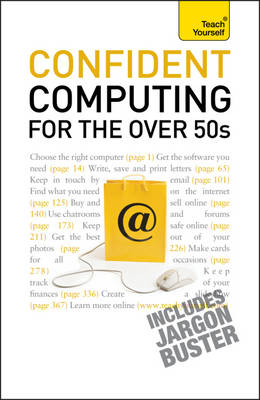
Confident Computing for the Over 50s (eBook)
300 Seiten
Hodder & Stoughton (Verlag)
978-1-4441-2923-6 (ISBN)
Do you feel that you have been left behind in the technological revolution? Assuming no prior knowledge of using a computer, this book is written in a practical, light-hearted and non-technical style to take the terror out of the technology.
Bob Reeves approaches the subject in a highly accessible way, focusing on the computer applications of most interest to middle and third agers, including correspondence, photography, shopping online, personal budgets and researching your family history. It begins with the very basics and ends with an invaluable 'jargonbuster' glossary.
The book is made up of a series of self-contained chapters, with the emphasis on what the computer is being used for, rather than the software needed. For example: rather than a chapter on 'word-processing', there is a chapter on 'letter writing', rather than 'desktop publishing' there is 'making a newsletter' and 'making cards for all occasions', rather than one on 'digital photography' there is ' getting photographs on to the computer' etc. There will be clear instructions supported with screenshots, tips and hints throughout.
This approach sets it apart from other books on basic computer skills as it covers what you really want to do with your computer, breaking down any technical barriers and making the book totally relevant to the novice computer user.
NOT GOT MUCH TIME?One, five and ten-minute introductions to key principles to get you started.
AUTHOR INSIGHTSLots of instant help with common problems and quick tips for success, based on the author's many years of experience.
TEST YOURSELFTests in the book and online to keep track of your progress.
EXTEND YOUR KNOWLEDGEExtra online articles at www.teachyourself.com to give you a richer understanding of computing.
FIVE THINGS TO REMEMBERQuick refreshers to help you remember the key facts.
TRY THISInnovative exercises illustrate what you've learnt and how to use it.
Do you feel that you have been left behind in the technological revolution? Assuming no prior knowledge of using a computer, this book is written in a practical, light-hearted and non-technical style to take the terror out of the technology.Bob Reeves approaches the subject in a highly accessible way, focusing on the computer applications of most interest to middle and third agers, including correspondence, photography, shopping online, personal budgets and researching your family history. It begins with the very basics and ends with an invaluable 'jargonbuster' glossary.The book is made up of a series of self-contained chapters, with the emphasis on what the computer is being used for, rather than the software needed. For example: rather than a chapter on 'word-processing', there is a chapter on 'letter writing'; rather than 'desktop publishing' there is 'making a newsletter' and 'making cards for all occasions'; rather than one on 'digital photography' there is ' getting photographs on to the computer' etc. There will be clear instructions supported with screenshots, tips and hints throughout.This approach sets it apart from other books on basic computer skills as it covers what you really want to do with your computer, breaking down any technical barriers and making the book totally relevant to the novice computer user.NOT GOT MUCH TIME?One, five and ten-minute introductions to key principles to get you started.AUTHOR INSIGHTSLots of instant help with common problems and quick tips for success, based on the author's many years of experience.TEST YOURSELFTests in the book and online to keep track of your progress.EXTEND YOUR KNOWLEDGEExtra online articles at www.teachyourself.com to give you a richer understanding of computing.FIVE THINGS TO REMEMBERQuick refreshers to help you remember the key facts.TRY THISInnovative exercises illustrate what you've learnt and how to use it.
| Erscheint lt. Verlag | 26.3.2010 |
|---|---|
| Sprache | englisch |
| Themenwelt | Schulbuch / Wörterbuch |
| Informatik ► Office Programme ► Outlook | |
| Mathematik / Informatik ► Informatik ► Theorie / Studium | |
| Mathematik / Informatik ► Informatik ► Web / Internet | |
| Informatik ► Weitere Themen ► Hardware | |
| ISBN-10 | 1-4441-2923-6 / 1444129236 |
| ISBN-13 | 978-1-4441-2923-6 / 9781444129236 |
| Informationen gemäß Produktsicherheitsverordnung (GPSR) | |
| Haben Sie eine Frage zum Produkt? |
 EPUB (Adobe DRM)
Kopierschutz: Adobe-DRM
Adobe-DRM ist ein Kopierschutz, der das eBook vor Mißbrauch schützen soll. Dabei wird das eBook bereits beim Download auf Ihre persönliche Adobe-ID autorisiert. Lesen können Sie das eBook dann nur auf den Geräten, welche ebenfalls auf Ihre Adobe-ID registriert sind.
Details zum Adobe-DRM
Dateiformat: EPUB (Electronic Publication)
EPUB ist ein offener Standard für eBooks und eignet sich besonders zur Darstellung von Belletristik und Sachbüchern. Der Fließtext wird dynamisch an die Display- und Schriftgröße angepasst. Auch für mobile Lesegeräte ist EPUB daher gut geeignet.
Systemvoraussetzungen:
PC/Mac: Mit einem PC oder Mac können Sie dieses eBook lesen. Sie benötigen eine
eReader: Dieses eBook kann mit (fast) allen eBook-Readern gelesen werden. Mit dem amazon-Kindle ist es aber nicht kompatibel.
Smartphone/Tablet: Egal ob Apple oder Android, dieses eBook können Sie lesen. Sie benötigen eine
Geräteliste und zusätzliche Hinweise
Buying eBooks from abroad
For tax law reasons we can sell eBooks just within Germany and Switzerland. Regrettably we cannot fulfill eBook-orders from other countries.
aus dem Bereich