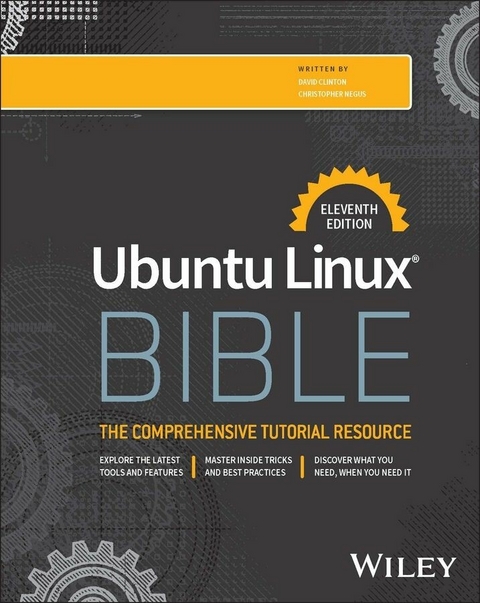
Ubuntu Linux Bible (eBook)
1174 Seiten
Wiley (Verlag)
978-1-394-34977-7 (ISBN)
The latest version of the gold standard in Ubuntu Linux resources
In the freshly updated eleventh edition of Ubuntu Linux Bible, a team of veteran Linux educators delivers a comprehensive discussion of the Ubuntu Linux operating system. Perfect for absolute beginners and experienced users and server admins alike, this book explains the ins-and-outs of installing, configuring, maintaining, optimizing, and using Ubuntu systems.
This edition builds on the user-centric approach used by previous editions, showing you exactly how to perform common and essential tasks, like interfacing with popular IoT devices. The book covers:
- Becoming a Linux power user: Using the Shell, navigating the filesystem, and more
- Installing and configuring an Ubuntu Linux desktop or server
- Linux server administration, including managing remote access and common desktop network configuration settings
- Linux security techniques, including cryptography, PAM, and AppArmor
The Ubuntu Linux Bible is intuitively organized, allowing you to skip quickly to the section you need in the moment. It also covers the latest version of the popular Linux distribution - v24.04 at the time of writing - as well as the previous version. You'll also find:
- Complete coverage of the enterprise and network functionality offered by Ubuntu, like web servers, networked file sharing, and DHCP and DNS management
- Up-to-date explanations of desktop Ubuntu configuration, including user management, system backups, printer and device management, and wireless features
- End-of-chapter exercises and questions, complete with answers, to help you develop your hands-on Ubuntu skillset
Perfect for Ubuntu Linux beginners and novice users, Ubuntu Linux Bible is also an essential resource for anyone transitioning from Windows desktops and servers looking for concise, accurate, and expert guidance in the Ubuntu OS.
David Clinton is a system administrator, teacher, and writer. He has administered, written about, and created training material for many important technology subjects including Linux systems, cloud computing (AWS in particular), and container technologies like Docker. Many of his video training courses can be found on Pluralsight.com, and links to his other books (on Linux administration and server virtualization) can be found at bootstrap-it.com.
Christopher Negus has been teaching and writing about Linux and UNIX for over 25 years. He's an instructor and principal technical writer for Red Hat, Inc., and the author of dozens of Linux and UNIX books, including every edition of the Red Hat Linux Bible, CentOS Bible, Fedora Bible, Ubuntu Linux Toolbox, and more.
The latest version of the gold standard in Ubuntu Linux resources In the freshly updated eleventh edition of Ubuntu Linux Bible, a team of veteran Linux educators delivers a comprehensive discussion of the Ubuntu Linux operating system. Perfect for absolute beginners and experienced users and server admins alike, this book explains the ins-and-outs of installing, configuring, maintaining, optimizing, and using Ubuntu systems. This edition builds on the user-centric approach used by previous editions, showing you exactly how to perform common and essential tasks, like interfacing with popular IoT devices. The book covers: Becoming a Linux power user: Using the Shell, navigating the filesystem, and more Installing and configuring an Ubuntu Linux desktop or server Linux server administration, including managing remote access and common desktop network configuration settings Linux security techniques, including cryptography, PAM, and AppArmor The Ubuntu Linux Bible is intuitively organized, allowing you to skip quickly to the section you need in the moment. It also covers the latest version of the popular Linux distribution v24.04 at the time of writing as well as the previous version. You'll also find: Complete coverage of the enterprise and network functionality offered by Ubuntu, like web servers, networked file sharing, and DHCP and DNS management Up-to-date explanations of desktop Ubuntu configuration, including user management, system backups, printer and device management, and wireless features End-of-chapter exercises and questions, complete with answers, to help you develop your hands-on Ubuntu skillset Perfect for Ubuntu Linux beginners and novice users, Ubuntu Linux Bible is also an essential resource for anyone transitioning from Windows desktops and servers looking for concise, accurate, and expert guidance in the Ubuntu OS.
Introduction
You can’t learn Ubuntu without using it. But if you’re ready for some serious hands-on research and experimentation, you can go a long way with this book. The Ubuntu Linux Bible is based on the 11th edition of Linux Bible, but has been refocused to ensure everything will work specifically on Ubuntu “right out of the box.”
Ubuntu may be the world’s most popular all-purpose Linux distribution. Canonical, the company that stands behind Ubuntu, reports that “Ubuntu powers millions of PCs worldwide.” It describes it as “the world’s most popular operating system across public clouds and OpenStack clouds” and “the #1 OS for containers.”
Most of the skills we’ll learn here will transfer well to other Linux distributions—and especially to distros like Debian, Mint, and Kali Linux that share upstream sources with Ubuntu.
So if you’re looking to get in on the action, stick around for the whole thing.
- Beginner to certified professional: As long as you have used a computer, mouse, and keyboard, you can reach good places using this book. We’ll show you how to get and install Ubuntu, quickly put it to productive use, use it to solve critical problems and build powerful server environments, and ultimately excel at administering and securing it.
- System administrator focused: When you’re finished with this book, you will know how to use, modify, and maintain Ubuntu. Almost all of the topics needed to achieve one or more Linux administration certifications are covered in this book. That said, many software developers and hobbyists will also enjoy it as they work to improve their skills.
- Emphasis on command-line tools: Although point-and-click graphic interfaces are as good or better as anything else these days, many advanced features can only be utilized by entering commands and editing configuration files manually. We’ll mostly focus on mastering the Linux command-line shell.
- Many, many demos and exercises: Instead of just telling you what Ubuntu does, we actually show you what it does. Then, to make sure that you’ve nailed it, you’ll have the opportunity to try it yourself. Every procedure and exercise has been tested to work in Ubuntu.
Ubuntu Linux Bible includes in-depth discussions covering server virtualization, infrastructure orchestration, and managing cloud and containerized applications (individually or at scale):
- Cockpit administration web UI: Since the dawn of the Linux age, people have struggled to develop simple graphical or browser-based interfaces for managing Linux systems. Cockpit may well have finally delivered a way to manage the basic Linux features through its web UI. Throughout this book, Cockpit will be our graphic tool of choice. With Cockpit, you can now add users, manage storage, monitor activities, and do many other administrative tasks through a single interface.
- Cloud technologies: Our coverage will include setting up your own Linux host for running virtual machines and running Linux in a cloud environment, such as Amazon Web Services. Linux is at the heart of most technological advances in cloud computing today. That means you need a solid understanding of Linux to work effectively in tomorrow’s data centers. The first chapters will cover all the Linux basics, which you’ll use through our various cutting-edge virtualization, networking, and storage administration exercises.
- Ansible: Automating tasks for managing systems is now an unavoidable part of modern digital administration. Using Ansible, you can create playbooks that define the state of a Linux system. This includes things like setting which packages are installed, which services are running, and how features are configured. A playbook can configure one system or a thousand systems, be combined to form a set of system services, and be run again to return a system to a defined state. You’ll be introduced to Ansible, create your first Ansible playbook, and run ad hoc Ansible commands.
- Containers: Packaging and running applications in containers is becoming the preferred method for deploying, managing, and updating small, scalable software services and features. You’ll learn how to pull container images, run them, stop them, and even build your own container images using LXD and Docker.
- Kubernetes: While containers are nice on their own, to be able to deploy, manage, and upgrade containers in a large enterprise you need an orchestration platform. The Kubernetes project provides a powerful platform for just that purpose.
How This Book Is Organized
The book is organized to enable you to start off at the very beginning with Linux and grow to become a professional Ubuntu system administrator and power user.
Part I, “Getting Started,” includes two chapters designed to help you understand what Linux is and get you started with an Ubuntu desktop:
- Chapter 1, “Starting With Linux,” covers topics such as what the Linux operating system is, where Ubuntu fits in, and how to get started using it.
- Chapter 2, “Creating the Perfect Linux Desktop,” provides information on how you can create a desktop system and use some of the most popular desktop features.
Part II, “Becoming a Linux Power User,” provides in-depth details on how to use the Linux shell, work with filesystems, manipulate text files, manage processes, and use shell scripts:
- Chapter 3, “Using the Shell,” includes information on how to access a shell, run commands, recall commands (using history), and do tab completion. The chapter also describes how to use variables, aliases, and man pages (traditional Linux command reference pages).
- Chapter 4, “Moving Around the Filesystem,” includes commands for listing, creating, copying, and moving files and directories. More advanced topics in this chapter include filesystem security, such as file ownership, permissions, and access control lists.
- Chapter 5, “Working With Text Files,” includes everything from basic text editors to tools for finding files and searching for text within files.
- Chapter 6, “Managing Running Processes,” describes how to see what processes are running on your system and change them. Ways of changing processes include killing, pausing, and sending other types of signals.
- Chapter 7, “Writing Simple Shell Scripts,” includes shell commands and functions that you can gather together into a file to run as a command itself.
In Part III, “Becoming a Linux System Administrator,” you learn how to administer Ubuntu systems:
- Chapter 8, “Learning System Administration,” provides information on basic graphical tools, commands, and configuration files for administering Ubuntu systems. It introduces the Cockpit web UI for simplified, centralized administration.
- Chapter 9, “Installing Linux,” covers common installation tasks, such as disk partitioning and initial software package selection, as well as more advanced installation tools.
- Chapter 10, “Getting and Managing Software,” provides an understanding of how software packages work and how to get and manage software packages.
- Chapter 11, “Managing User Accounts,” discusses tools for adding and deleting users and groups as well as how to centralize user account management.
- Chapter 12, “Managing Disks and Filesystems,” provides information on adding partitions, creating filesystems, and mounting filesystems, as well as working with logical volume management.
In Part IV, “Becoming a Linux Server Administrator,” you learn to create powerful network servers and the tools needed to manage them:
- Chapter 13, “Understanding Server Administration,” covers remote logging, monitoring tools, and the Linux boot process.
- Chapter 14, “Administering Networking,” discusses how to configure networking.
- Chapter 15, “Starting and Stopping Services,” provides information on process management tools—especially systemd.
- Chapter 16, “Configuring a Print Server,” describes how to configure printers to use locally on your Ubuntu system or over the network from other computers.
- Chapter 17, “Configuring a Web Server,” describes how to configure an Apache web server.
- Chapter 18, “Configuring an FTP Server,” covers procedures for setting up a vsftpd FTP server that can be used by others to download files from your Ubuntu system over the network.
- Chapter 19, “Configuring a Windows File Sharing (Samba) Server,” covers Windows file server configuration with Samba.
- Chapter 20, “Configuring an NFS File Server,” describes how to use Network File System features to share folders of files among systems over a network.
- Chapter 21, “Troubleshooting Linux,” covers popular tools for troubleshooting your Ubuntu system.
| Erscheint lt. Verlag | 18.11.2025 |
|---|---|
| Sprache | englisch |
| Themenwelt | Informatik ► Betriebssysteme / Server ► Unix / Linux |
| Informatik ► Weitere Themen ► Hardware | |
| Schlagworte | ubuntu linux book • ubuntu linux configuration • ubuntu linux desktop • ubuntu linux guide • ubuntu linux handbook • Ubuntu linux server administration • ubuntu linux server configuration • ubuntu linux server installation • ubuntu linux tutorial |
| ISBN-10 | 1-394-34977-7 / 1394349777 |
| ISBN-13 | 978-1-394-34977-7 / 9781394349777 |
| Informationen gemäß Produktsicherheitsverordnung (GPSR) | |
| Haben Sie eine Frage zum Produkt? |
 EPUB (Adobe DRM)
Kopierschutz: Adobe-DRM
Adobe-DRM ist ein Kopierschutz, der das eBook vor Mißbrauch schützen soll. Dabei wird das eBook bereits beim Download auf Ihre persönliche Adobe-ID autorisiert. Lesen können Sie das eBook dann nur auf den Geräten, welche ebenfalls auf Ihre Adobe-ID registriert sind.
Details zum Adobe-DRM
Dateiformat: EPUB (Electronic Publication)
EPUB ist ein offener Standard für eBooks und eignet sich besonders zur Darstellung von Belletristik und Sachbüchern. Der Fließtext wird dynamisch an die Display- und Schriftgröße angepasst. Auch für mobile Lesegeräte ist EPUB daher gut geeignet.
Systemvoraussetzungen:
PC/Mac: Mit einem PC oder Mac können Sie dieses eBook lesen. Sie benötigen eine
eReader: Dieses eBook kann mit (fast) allen eBook-Readern gelesen werden. Mit dem amazon-Kindle ist es aber nicht kompatibel.
Smartphone/Tablet: Egal ob Apple oder Android, dieses eBook können Sie lesen. Sie benötigen eine
Geräteliste und zusätzliche Hinweise
Buying eBooks from abroad
For tax law reasons we can sell eBooks just within Germany and Switzerland. Regrettably we cannot fulfill eBook-orders from other countries.
aus dem Bereich