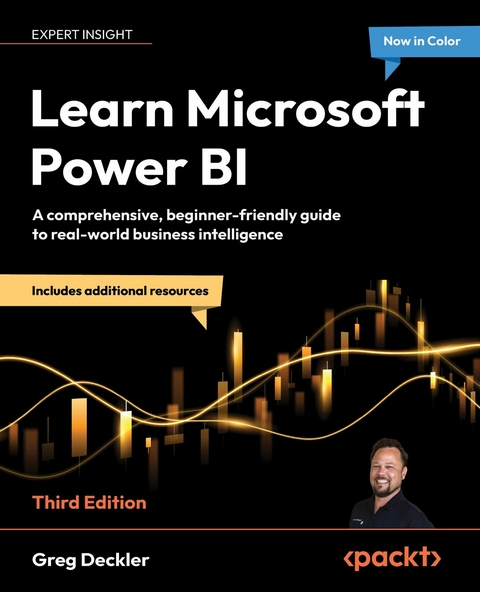
Learn Microsoft Power BI (eBook)
468 Seiten
Packt Publishing (Verlag)
978-1-83664-740-9 (ISBN)
Everyone's swimming in data. The ones who thrive? They know how to make sense of it with the right tools quickly and effectively. Learn Microsoft Power BI, Third Edition is your essential guide to mastering one of the most powerful platforms for data analysis and visualization. In this newly revised and expanded edition, Greg Deckler, a 7-time Microsoft MVP and Power BI expert, takes you on a journey of data exploration and discovery using Microsoft Power BI to ingest, cleanse, and organize data and uncover key business insights that can be shared effectively.
Covering the latest features and interface changes, including Microsoft Fabric and Copilot, this book guides you through deploying, adopting, and governing Power BI within your organization. You'll get to grips with the fundamentals of business intelligence projects and learn how to leverage your expertise in the broader Power BI ecosystem. From ingesting and cleansing your data to transforming it into stunning visualizations, reports, and dashboards that speak to business decision-makers, this book will fully prepare you to become the data analysis hero of your organization or kickstart a rewarding career in business intelligence.
Harness the power of Power BI, Microsoft Fabric, and Copilot to deliver insights that drive enterprise success. Now includes downloadable PowerPoint slides for each chapter and exclusive video tutorials in both classic and preview Power BI interfaces, ideal for educators and self-learners.Key FeaturesLearn Power BI from the ground up with real-world examples that cover both basic and advanced featuresDevelop powerful analytical models and reports that extract key business insightsPublish, share, and collaborate on reports, dashboards, apps, and goalsPurchase of the print or Kindle book includes a free PDF eBookBook DescriptionEveryone's swimming in data. The ones who thrive? They know how to make sense of it with the right tools quickly and effectively. Learn Microsoft Power BI, Third Edition is your essential guide to mastering one of the most powerful platforms for data analysis and visualization. In this newly revised and expanded edition, Greg Deckler, a 7-time Microsoft MVP and Power BI expert, takes you on a journey of data exploration and discovery using Microsoft Power BI to ingest, cleanse, and organize data and uncover key business insights that can be shared effectively. Covering the latest features and interface changes, including Microsoft Fabric and Copilot, this book guides you through deploying, adopting, and governing Power BI within your organization. You ll get to grips with the fundamentals of business intelligence projects and learn how to leverage your expertise in the broader Power BI ecosystem. From ingesting and cleansing your data to transforming it into stunning visualizations, reports, and dashboards that speak to business decision-makers, this book will fully prepare you to become the data analysis hero of your organization or kickstart a rewarding career in business intelligence.What you will learnUnderstand the fundamentals of Microsoft Fabric and CopilotPlan and manage your business intelligence projectsConnect to and transform data using Power QueryCreate semantic models and DAX calculations optimized for analysis and reportingUncover business insights and design professional reportsDeploy and govern Power BI, with a focus on gateways and deployment pipelinesWho this book is forIf you're a data analyst, IT manager, or BI user new to employing Power BI for solving business intelligence problems, this book is for you. It s also a valuable resource for those looking to migrate from other BI tools and create powerful and interactive dashboards. No experience with Power BI, Microsoft Fabric, or Copilot is required.]]>
Preface
To succeed in today’s fast-paced business world, organizations need Business Intelligence (BI) capabilities more than ever in order to make smarter decisions that allow them to be more efficient, effective, and profitable. This book is an entry-level guide specifically designed to get you up and running quickly with Power BI, including data import and transformation, data modeling, visualization, and analytical techniques, without any prior knowledge of BI or Power BI.
You will find this book useful if you want to become knowledgeable about the extensive Power BI ecosystem. You’ll start by understanding basic BI concepts and how BI projects are conducted. In short order, you will have Power BI Desktop installed and understand its major components. As you progress, step-by-step instructions are provided for using the Power Query Editor to ingest, cleanse, and transform your data, creating simple and complex DAX calculations, and visualizing your data in ways that truly bring your data to life. Additionally, you’ll gain hands-on experience in creating visually stunning reports that speak to business decision-makers and understand how to share and collaborate with others. Finally, you will understand how Power BI is deployed, governed, and adopted within organizations, the job and career opportunities available to BI professionals, and how to continue your learning.
By the end of this book, you’ll be ready to create effective reports and dashboards using the latest features of Power BI.
Who this book is for
If you are new to BI or you are a business analyst or other technical or non-technical user who is new to Power BI, then this book is for you. No prior experience in BI or Power BI is required in order to proceed.
What this book covers
Chapter 1, Understanding Business Intelligence and Power BI, provides an introduction to key concepts of business intelligence, an overview of the Power BI ecosystem, and licensing options for Power BI, and introduces Power BI Desktop and the Power BI service.
Chapter 2, Planning Projects with Power BI, explains how BI projects are planned and executed, including identifying stakeholders, goals, requirements, required resources, and data sources, and introduces the example scenario used throughout the rest of the book.
Chapter 3, Up and Running with Power BI Desktop, provides instructions for downloading and installing Power BI Desktop and an overview of the major components of the Desktop including Report, Data and Model views, the menu tabs, the filters, and the Visualizations and Fields panes. It also introduces the creation of tables and visualizations.
Chapter 4, Connecting to and Transforming Data, introduces the Power Query Editor for importing and transforming data, including transposing data, creating custom columns, adding index columns, splitting columns, referencing queries, appending and merging queries, additional transformation functions, and importing data.
Chapter 5, Creating Semantic Models and Calculations, demonstrates how to create a data model by using the model view to create relationships between tables, and how to create and troubleshoot data analysis calculations.
Chapter 6, Unlocking Insights, introduces analysis concepts such as groups and hierarchies, row-level security, report navigation using drill through and buttons, question and answer, bookmarks, and advanced analysis techniques such as analysis, summarization, filtering, gauges, key performance indicators, What if parameters, conditional formatting, quick measures, report page tooltips, and advanced visuals such as the Key Influencers visual.
Chapter 7, Creating the Final Report, provides step-by-step instructions for creating a professional, multi-page report that provides data insights to business decision-makers.
Chapter 8, Publishing and Sharing, demonstrates how to publish the final report to the Power BI service and share the report with a larger audience.
Chapter 9, Using Reports in the Power BI Service, focuses on using reports in the Power BI service including all of the various report functions such as editing reports, embedding, exporting, bookmarks, lineage view, comments, subscriptions, and Microsoft Teams integration.
Chapter 10, Understanding Dashboards, Apps, Metrics, and Security, provides information on creating and working with dashboards, including pinning and managing tiles, the creation and distribution of apps, the creation of scorecards and goals, and an overview of permissions and security.
Chapter 11, Refreshing Content, demonstrates how to install, configure, and manage a data gateway, and how to schedule automatic refreshes for datasets within the Power BI service.
Chapter 12, Deploying, Governing, and Adopting Power BI, introduces different deployment usage models for Power BI within organizations, the concept of governance of Power BI systems including all of the various Power BI Service tenant settings, and how to drive the adoption of Power BI within an organization.
Chapter 13, Working with Microsoft Fabric and Copilot, introduces you to the powerful capabilities of Microsoft Fabric and Copilot within the context of scaling a Power BI solution for enterprise use, including the full process of building and managing Fabric items such as dataflows, warehouses, and semantic models. It also introduces Microsoft Copilot, showcasing how generative AI can assist with data preparation, report creation, SQL generation, and troubleshooting across Fabric workloads.
Chapter 14, Putting Your Knowledge to Use, describes the overall opportunities available in BI, the various types of BI jobs, roles, and responsibilities, the differences between consulting and internal employees, job search strategies, interviewing and compensation negotiation tips, and finally, information on blogs and other websites to continue your journey of learning Power BI.
To get the most out of this book
No prior experience in BI or Power BI is necessary. A keen interest in data and data analytics is helpful as well as prior experience with other BI tools. Running the Power BI Desktop and Data Gateway both require using a computer with Windows as the operating system.
Chapter 10, Understanding Dashboards, Apps, Metrics, and Security, includes material that requires a Fabric trial capacity or Premium Per User (PPU) licensing.
Chapter 13, Working with Microsoft Fabric and Copilot includes material that requires a Fabric trial capacity.
If you are using the digital version of this book, we advise you to type the code yourself or access the code from the book’s GitHub repository (a link is available in the next section). Doing so will help you avoid any potential errors related to the copying and pasting of code.
Join the Power BI Community at https://community.powerbi.com!
Download the example code files
The code bundle for the book is hosted on GitHub at https://github.com/PacktPublishing/Learn-Microsoft-Power-BI_3E. We also have other code bundles from our rich catalog of books and videos available at https://github.com/PacktPublishing. Check them out!
Download the color images
We also provide a PDF file that has color images of the screenshots/diagrams used in this book. You can download it here: https://packt.link/gbp/9781836647416.
Conventions used
There are a number of text conventions used throughout this book.
Code in text: Indicates code words in the text, database table names, folder names, filenames, file extensions, pathnames, dummy URLs, user input, and X/Twitter handles. Here is an example: “The first parameter is the Hours table, on line 4, and a filter, on line 5.”
A block of code is set as follows:
Column 3 = VAR __Employee = [EmployeeID] VAR __Table = FILTER( ALL('Hours'), [Category] = "Billable" && [EmployeeID] = __Employee ) VAR __Result = SUMX( __Table, [Hours] ) RETURN __Result Bold: Indicates a new term, an important word, or words that you see on screen. For instance, words in menus or dialog boxes appear in bold. Here is an example: “Power Platform includes Power BI datasets and dataflows, as well as the Dataverse.”
Warnings or important notes appear like this.
Tips and tricks appear like this.
Get in touch
Feedback from our readers is always welcome.
General feedback: If you have questions about any aspect of this book or have any general feedback, please email us at customercare@packt.com and mention the book’s title in the subject of your message.
Errata: Although we have taken every care to...
| Erscheint lt. Verlag | 22.8.2025 |
|---|---|
| Sprache | englisch |
| Themenwelt | Mathematik / Informatik ► Informatik |
| ISBN-10 | 1-83664-740-9 / 1836647409 |
| ISBN-13 | 978-1-83664-740-9 / 9781836647409 |
| Informationen gemäß Produktsicherheitsverordnung (GPSR) | |
| Haben Sie eine Frage zum Produkt? |
 EPUB (Ohne DRM)
Digital Rights Management: ohne DRM
Dieses eBook enthält kein DRM oder Kopierschutz. Eine Weitergabe an Dritte ist jedoch rechtlich nicht zulässig, weil Sie beim Kauf nur die Rechte an der persönlichen Nutzung erwerben.
Dateiformat: EPUB (Electronic Publication)
EPUB ist ein offener Standard für eBooks und eignet sich besonders zur Darstellung von Belletristik und Sachbüchern. Der Fließtext wird dynamisch an die Display- und Schriftgröße angepasst. Auch für mobile Lesegeräte ist EPUB daher gut geeignet.
Systemvoraussetzungen:
PC/Mac: Mit einem PC oder Mac können Sie dieses eBook lesen. Sie benötigen dafür die kostenlose Software Adobe Digital Editions.
eReader: Dieses eBook kann mit (fast) allen eBook-Readern gelesen werden. Mit dem amazon-Kindle ist es aber nicht kompatibel.
Smartphone/Tablet: Egal ob Apple oder Android, dieses eBook können Sie lesen. Sie benötigen dafür eine kostenlose App.
Geräteliste und zusätzliche Hinweise
Buying eBooks from abroad
For tax law reasons we can sell eBooks just within Germany and Switzerland. Regrettably we cannot fulfill eBook-orders from other countries.
aus dem Bereich