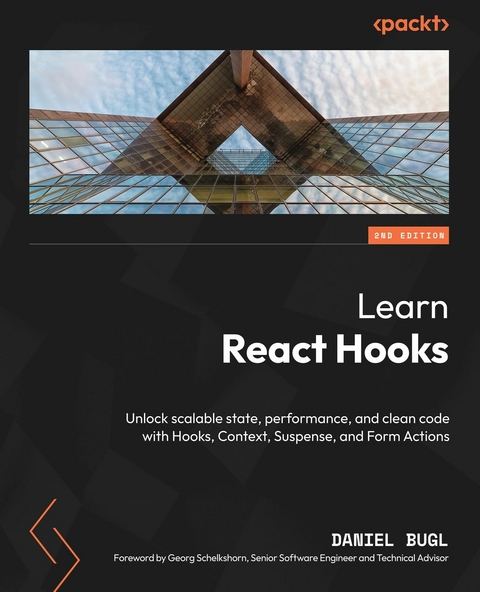
Learn React Hooks (eBook)
372 Seiten
Packt Publishing (Verlag)
978-1-83620-916-4 (ISBN)
React Hooks allow you to easily encapsulate, reuse, and refactor logic with the same level of simplicity that components bring to user interface organization.
In this second edition, React expert and author of many popular React books, Daniel Bugl guides you through the full spectrum of React Hooks, and teaches you how to handle forms, routing, and data fetching in modern React development. This edition is fully updated to React 19, with a revamped structure, expanded real-world use cases, and coverage of all newly introduced Hooks.
Starting with the fundamentals, you'll gain a deep understanding of how Hooks work under the hood and how to apply Hooks patterns efficiently. The chapters guide you through using State, Reducer, and Effect Hooks to manage application state, side effects, and complex logic for building your first Hook-based app. You'll utilize Suspense and Context APIs for streamlined data fetching and state management, master Form Actions for handling submissions, and implement routing with Hooks. You'll also create custom Hooks for advanced functionality and write tests for reliability. Finally, you'll learn how to refactor an existing app with class components into modern Hooks architecture.
By the end of this React book, you'll be well-equipped to use React Hooks to modernize and optimize your React projects.
Grasp the core concepts of React Hooks and enhance your development workflow with best practices and advanced patterns derived from modern React 19 featuresKey FeaturesBuild custom Hooks to simplify complex logic and promote code reusabilityTransform class components into modern, hook-based function components, and write robust testsBuild maintainable, production-ready UIs using React 19's declarative approach and ecosystem toolsPurchase of the print or Kindle book includes a free PDF eBookBook DescriptionReact Hooks allow you to easily encapsulate, reuse, and refactor logic with the same level of simplicity that components bring to user interface organization. In this second edition, React expert and author of many popular React books, Daniel Bugl guides you through the full spectrum of React Hooks, and teaches you how to handle forms, routing, and data fetching in modern React development. This edition is fully updated to React 19, with a revamped structure, expanded real-world use cases, and coverage of all newly introduced Hooks. Starting with the fundamentals, you'll gain a deep understanding of how Hooks work under the hood and how to apply Hooks patterns efficiently. The chapters guide you through using State, Reducer, and Effect Hooks to manage application state, side effects, and complex logic for building your first Hook-based app. You'll utilize Suspense and Context APIs for streamlined data fetching and state management, master Form Actions for handling submissions, and implement routing with Hooks. You ll also create custom Hooks for advanced functionality and write tests for reliability. Finally, you ll learn how to refactor an existing app with class components into modern Hooks architecture. By the end of this React book, you'll be well-equipped to use React Hooks to modernize and optimize your React projects.What you will learnMaster and apply new React 19 Hooks, such as useActionState, useFormStatus, useOptimistic, and othersUse React Hooks and Context to manage state in your web applicationsEfficiently fetch, update, and cache data using TanStack Query and SuspenseManage user input and form submission using Form Actions with HooksDiscover how to implement routing in your apps using React Router and HooksCreate and test your own Hooks to encapsulate, reuse, and refactor logic in your appsWho this book is forThis book is ideal for React developers looking to modernize their applications using React Hooks, Context, and Suspense. Beginners and experienced developers alike will gain a solid understanding of Hooks and their internal workings. If you're familiar with React and JavaScript, this book will help you upskill by teaching you best practices, performance optimization, and scalable application building. No prior experience with Hooks is required this book covers everything from fundamentals to advanced patterns.]]>
1
Introducing React and React Hooks
React is a JavaScript library used to build efficient and extensible web applications. React was developed by Meta and is used in many large-scale web applications, such as Facebook, Instagram, Netflix, Shopify, Airbnb, Cloudflare, and the BBC.
In this book, we are going to learn how to build complex and efficient user interfaces with React, while keeping the code simple and extensible. Using the paradigm of React Hooks, we can greatly simplify dealing with state and effects in web applications, ensuring the potential for growing and extending the application later. We are also going to learn about React Context, React Suspense, and Form Actions, as well as how they can be used with Hooks. Finally, we are going to learn how to build our own Hooks and how to migrate existing applications from React class components to a React Hooks-based architecture.
In this first chapter, we are going to learn about the fundamental principles of React and React Hooks. We will start by learning what React and React Hooks are, and why we should use them. Then, we will move on to learn about the inner workings of Hooks. Finally, you will be introduced to the Hooks that are provided by React, and a couple of Hooks provided by the community – such as data fetching and routing Hooks. By learning the fundamentals of React and React Hooks, we will be better able to understand the concepts that will be introduced throughout this book.
In this chapter, we are going to cover the following main topics:
- Principles of React
- Motivation to use React Hooks
- Setting up the development environment
- Getting started with React Hooks
Technical requirements
A fairly recent version of Node.js should already be installed. The Node Package Manager (npm) also needs to be installed (it should come with Node.js). For more information on how to install Node.js, please check out their official website: https://nodejs.org/.
We are going to use Visual Studio Code (VS Code) for the guides in this book, but everything should work similarly in any other editor. For more information on how to install VS Code, please refer to their official website: https://code.visualstudio.com.
In this book, we use the following versions:
- Node.js v22.14.0
npmv10.9.2- Visual Studio Code v1.97.2
The versions mentioned in the preceding list are the ones used in the book. While installing a newer version should not be an issue, please note that certain steps might work differently on a newer version. If you are having an issue with the code and steps provided in this book, please try using the mentioned versions.
You can find the code for this chapter on GitHub: https://github.com/PacktPublishing/Learn-React-Hooks-Second-Edition/tree/main/Chapter01.
It is highly recommended that you write the code on your own. Do not simply run the code examples that are provided with the book. It is important to write the code yourself to be able to learn and understand it properly. However, if you run into any issues, you can always refer to the code example.
Principles of React
Before we start learning how to set up a React project, let’s revisit the three fundamental principles of React. These principles allow us to easily write scalable web applications.
React is based on three fundamental principles:
- Declarative: Instead of telling React how to do things, we tell it what we want it to do. For example, if we change data, we don’t need to tell React which components need to be re-rendered. That would be complex and error-prone. Instead, we just tell React that data has changed and all components using this data will be efficiently updated and re-rendered for us. React takes care of the details so that we can focus on the tasks at hand to easily develop our web application.
- Component-based: React encapsulates components that manage their own state and views and then allows us to compose them in order to create complex user interfaces.
- Learn once, write anywhere: React does not make assumptions about your technology stack and tries to ensure that you can develop apps without rewriting existing code as much as possible.
React’s three fundamental principles make it easy to write code, encapsulate components, and share code across multiple platforms. Instead of reinventing the wheel, React always tries to make use of existing JavaScript features as much as possible. As a result, we are going to learn about software design patterns that will be applicable in many more cases than just designing user interfaces.
We just learned that React is component-based. In React, there are two types of components:
- Function components: JavaScript functions that take the props as an argument, and return the user interface (usually via JSX, which is an extension of the JavaScript syntax that allows us to write HTML-like markup directly within JavaScript code)
- Class components: JavaScript classes that provide a
rendermethod, which returns the user interface (usually via JSX)
While function components are easier to define and understand, in the past, class components were needed to deal with state, contexts, and many more of React’s advanced features. However, with React Hooks, we can use most of React’s advanced features without needing a class component!
There are certain features of React that, at the time of writing, are not possible with function components and Hooks yet. For example, defining error boundaries still requires class components and the componentDidCatch and getDerivedStateFromError lifecycle methods.
Motivation to use React Hooks
React always strives to make the developer experience as smooth as possible while ensuring to keep it performant enough, without the developer having to worry too much about how to optimize performance. However, throughout the years of using React, a couple of problems have been identified.
The code snippets in the following subsections are just intended to give you an understanding of why Hooks were needed, by giving examples of how developers previously dealt with certain problems in React. If you are not familiar with those old ways, do not worry, it’s not necessary to understand the old ways to follow along. In the upcoming sections, we are going to learn how to deal with these problems in a better way using React Hooks.
Let’s now take a look at these problems in the following subsections.
Confusing classes
In the past, we had to use class components with special functions called life cycle methods, such as componentDidUpdate, and special state-handling methods such as this.setState, to deal with state changes. React classes, and especially the this context, are hard to read and understand for both developers and machines.
this is a special keyword in JavaScript that always refers to the object that it belongs to:
- In a method,
thisrefers to the class object (instance of the class). - In an event handler,
thisrefers to the element that received the event. - In a function or standing alone,
thisrefers to the global object. For example, in a browser, the global object is theWindowobject. - In strict mode,
thisisundefinedin a function. - Additionally, methods such as
call()andapply()can change the object thatthisrefers to, so it can refer to any object.
For developers, classes are hard, because this always refers to different things, so sometimes (for example, in event handlers) we need to manually rebind it to the class object. For machines, classes are hard, because they do not know which methods in a class will be called and how this will be modified, making it hard to optimize performance and remove unused code.
Additionally, classes sometimes require us to write code in multiple places at once. For example, if we want to fetch data when the component renders or props of a component change, we need to do this using two methods: once in componentDidMount, and once in componentDidUpdate.
To give an example, let’s define a class component that fetches data from an API:
- First, we define a class component by extending the
React.Componentclass:class ExampleComponent extends React.Component { - Then, we define the
componentDidMountlife cycle method, where we pull data from an API:componentDidMount() { fetch(`http://my.api/${this.props.name}`) .then(…) }...
| Erscheint lt. Verlag | 23.5.2025 |
|---|---|
| Vorwort | Georg Schelkshorn |
| Sprache | englisch |
| Themenwelt | Mathematik / Informatik ► Informatik ► Web / Internet |
| ISBN-10 | 1-83620-916-9 / 1836209169 |
| ISBN-13 | 978-1-83620-916-4 / 9781836209164 |
| Informationen gemäß Produktsicherheitsverordnung (GPSR) | |
| Haben Sie eine Frage zum Produkt? |
 EPUB (Ohne DRM)
Digital Rights Management: ohne DRM
Dieses eBook enthält kein DRM oder Kopierschutz. Eine Weitergabe an Dritte ist jedoch rechtlich nicht zulässig, weil Sie beim Kauf nur die Rechte an der persönlichen Nutzung erwerben.
Dateiformat: EPUB (Electronic Publication)
EPUB ist ein offener Standard für eBooks und eignet sich besonders zur Darstellung von Belletristik und Sachbüchern. Der Fließtext wird dynamisch an die Display- und Schriftgröße angepasst. Auch für mobile Lesegeräte ist EPUB daher gut geeignet.
Systemvoraussetzungen:
PC/Mac: Mit einem PC oder Mac können Sie dieses eBook lesen. Sie benötigen dafür die kostenlose Software Adobe Digital Editions.
eReader: Dieses eBook kann mit (fast) allen eBook-Readern gelesen werden. Mit dem amazon-Kindle ist es aber nicht kompatibel.
Smartphone/Tablet: Egal ob Apple oder Android, dieses eBook können Sie lesen. Sie benötigen dafür eine kostenlose App.
Geräteliste und zusätzliche Hinweise
Buying eBooks from abroad
For tax law reasons we can sell eBooks just within Germany and Switzerland. Regrettably we cannot fulfill eBook-orders from other countries.
aus dem Bereich