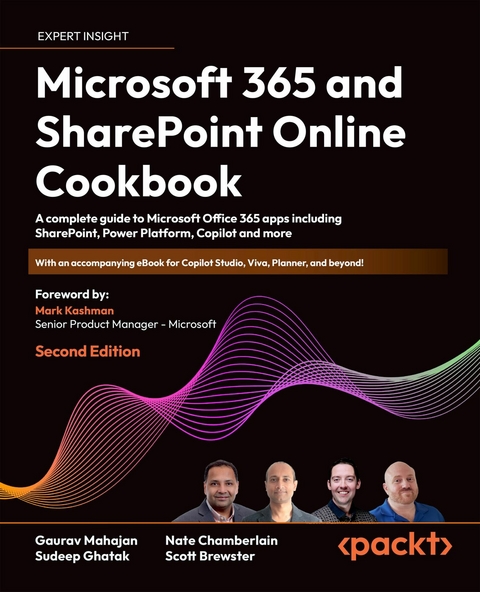
Microsoft 365 and SharePoint Online Cookbook (eBook)
640 Seiten
Packt Publishing (Verlag)
978-1-80324-737-3 (ISBN)
No detailed description available for "e;Microsoft 365 and SharePoint Online Cookbook"e;.
Preface
We have been working on SharePoint and related technologies since 2007, when Microsoft 365 wasn’t around, and we have seen it go through several transformations since then. One of the questions we have often been asked as consultants is “What is SharePoint?” We have, at times, struggled to answer that question because, unlike some other Microsoft products that focus on solving one problem, SharePoint is a platform that can be leveraged to help implement a multitude of business solutions.
The question is even harder to respond to when someone asks “What is Microsoft 365?” because it is even bigger than SharePoint. With this book, our goal is to answer those questions by providing practical guidance on and insights into how to carry out various tasks in all the different areas of Microsoft 365. While we have provided the necessary background and best practices where possible, we have deliberately stayed away from getting too technical to keep the recipes simple for those who are new to Microsoft 365.
Microsoft 365 is an ever-changing platform with frequent updates being made to it. As you can imagine, it is hard to write a book on such a rapidly changing platform. We have tried to keep the book as close to the latest updates as we can. However, you should expect to see some variations in the steps and images provided in this book. Having said that, the underlying concepts that guide these steps should remain the same.
This comprehensive guide encompasses all major applications within the Microsoft 365 suite, along with an exploration of Copilot, with the aim of providing you with a head start in adapting to Microsoft’s adoption of AI features on its platform. To achieve expert status, however, you will require additional study and lots and lots of hands-on practice.
Who this book is for
While writing this book, we had multiple audiences in mind.
On the one hand, we want to help end users become familiar with the many Microsoft 365 services. If you use these services in your business, you’ll learn the basic controls as well as some tips and tricks to boost your productivity.
On the other, more administrative, hand, we also wrote recipes with more technical concepts in mind. If you’re an IT administrator who wants to understand Microsoft 365 governance, or a business stakeholder or architect wanting to understand the tools of the trade for handling business workflows, there’s a lot for you to learn.
What this book covers
Chapter 1, Overview of Microsoft 365, summarizes the products available in the Microsoft 365 suite, what they are used for, and the general licensing information you should know about. You’ll learn how to sign in to Microsoft 365 and get to know its user interface.
Chapter 2, Introduction to SharePoint Online, provides recipes for the basic operations when using SharePoint, such as creating and sharing documents. This is useful for anyone who needs guidance on the essentials of using SharePoint.
Chapter 3, Modern Sites in SharePoint Online, explores content management using modern sites. You’ll get to know the modern site architecture and features available in SharePoint Online for creating and managing modern sites.
Chapter 4, Lists and Libraries in SharePoint Online, covers the creation and management of lists and libraries in SharePoint Online. These are fundamental components for organizing and storing information.
Chapter 5, Document Management in SharePoint Online, focuses on document management capabilities in SharePoint Online, including versioning, metadata, and document collaboration features.
Chapter 6, OneDrive, discusses the features and functionality of OneDrive, Microsoft’s cloud storage solution integrated with Microsoft 365. You’ll learn the basics of uploading, syncing, and sharing files.
Chapter 7, Microsoft Teams, explores Microsoft Teams, a collaboration platform that combines workplace chat, meetings, file storage, and application integration. The recipes in this chapter increase in complexity, so you can choose to learn basic controls or more complex topics such as adding connectors, using breakout rooms, and creating registration forms.
Chapter 8, Power Automate (Microsoft Flow), introduces Power Automate, Microsoft’s workflow automation tool for creating automated workflows across various applications and services. After creating a workflow, you’ll learn how to edit and test the flow before following recipes for exporting, importing, and sharing it.
Chapter 9, Creating Power Apps, guides users through the process of creating custom business applications using Power Apps, Microsoft’s low-code application development platform. You’ll learn how to create an app based on a template, connect to data sources, and add interactive screens to your app.
Chapter 10, Applying Power Apps, demonstrates how to deploy and integrate apps within your organization. You’ll learn how to embed an app in Teams and on a SharePoint page, as well as how to export and import your apps.
Chapter 11, Power BI, provides an overview of Power BI, Microsoft’s business analytics tool, for creating interactive reports and visualizations from data sources. While visualizing data is the end goal of Power BI, you’ll also learn important steps for transforming and modeling data.
Chapter 12, Overview of Copilot in Microsoft 365 and Power Platform, introduces Copilot, an AI-powered coding assistant, and explores its integration within Microsoft 365 and Power Platform. We’ll take a bite-sized tour of Copilot in all the most popular software and what you can do with it.
Please note that the following chapters are only available in the free eBook that supplements this book: https://packt.link/online-sup-book
Chapter 13, Term Store and Content Types in SharePoint Online, discusses the management of metadata and content types using the Term Store in SharePoint Online for improving content organization and search.
Chapter 14, Search in Microsoft 365, explores the search capabilities within Microsoft 365, including Microsoft Search and its integration across various applications.
Chapter 15, Microsoft Delve, provides an overview of Microsoft Delve, a personal search and discovery tool, for surfacing relevant content and connections within organizations.
Chapter 16, Microsoft 365 Groups, explores Microsoft 365 Groups, collaborative workspaces that integrate with various Microsoft 365 services, including Outlook, SharePoint, and Teams.
Chapter 17, Power Automate Desktop for RPA, introduces Power Automate Desktop, Microsoft’s robotic process automation (RPA) tool, for automating repetitive tasks across desktop applications.
Chapter 18, Copilot Studio (Power Virtual Agents), introduces Power Virtual Agents, Microsoft’s no-code chatbot development platform, a predecessor to Copilot Studio used for creating intelligent virtual agents to engage with users.
Chapter 19, Viva Insights, overviews the functionality of the Viva Insights app, including features for organizing your work calendar. As we’ll see, this is a “nice to have” application that aims to improve your work-life balance rather than performing staple tasks for your organization.
Chapter 20, Viva Learning, helps you get comfortable with Microsoft’s app for training and growing your skills, Viva Learning. You’ll learn what Viva Learning is, how to take courses on the app, review your learning activity, and suggest courses for your team.
Chapter 21, Viva Engage, prepares you to use Viva Engage, Microsoft’s enterprise social networking platform. You’ll find recipes for the basic functionalities of creating and joining Viva Engage communities, using the home feed, following people, and posting messages. In case you need some more administrative knowledge of Viva Engage, you’ll learn how to create a network and invite external members to your network.
Chapter 22, Planner, provides an overview of Microsoft Planner, a task management tool, for organizing and tracking work within teams and projects.
Chapter 23, Microsoft To Do, explores Microsoft To Do, a task management app, for organizing tasks and managing to-do lists across devices.
Chapter 24, Microsoft Forms, teaches you the basic features when using Microsoft Forms. As you’ll learn in the chapter, Forms is an easy solution for creating forms and quizzes. You’ll learn the differences between the two formats and what features are available in each.
Chapter 25, Custom Development – SharePoint Framework, is a more advanced chapter that discusses custom development using the SharePoint Framework (SPFx) for building solutions and extensions on the SharePoint platform. This is the only chapter that will require a beginner-level knowledge of JavaScript.
Chapter 26, Microsoft 365 on Mobile Devices, explores the features and capabilities of Microsoft 365 applications on mobile devices, enabling productivity on the go.
Note that the Appendix is part of...
| Erscheint lt. Verlag | 14.3.2024 |
|---|---|
| Vorwort | Mark Kashman |
| Sprache | englisch |
| Themenwelt | Mathematik / Informatik ► Informatik ► Netzwerke |
| Mathematik / Informatik ► Informatik ► Office Programme | |
| ISBN-10 | 1-80324-737-1 / 1803247371 |
| ISBN-13 | 978-1-80324-737-3 / 9781803247373 |
| Informationen gemäß Produktsicherheitsverordnung (GPSR) | |
| Haben Sie eine Frage zum Produkt? |
 EPUB (Adobe DRM)
Größe: 67,3 MB
Kopierschutz: Adobe-DRM
Adobe-DRM ist ein Kopierschutz, der das eBook vor Mißbrauch schützen soll. Dabei wird das eBook bereits beim Download auf Ihre persönliche Adobe-ID autorisiert. Lesen können Sie das eBook dann nur auf den Geräten, welche ebenfalls auf Ihre Adobe-ID registriert sind.
Details zum Adobe-DRM
Dateiformat: EPUB (Electronic Publication)
EPUB ist ein offener Standard für eBooks und eignet sich besonders zur Darstellung von Belletristik und Sachbüchern. Der Fließtext wird dynamisch an die Display- und Schriftgröße angepasst. Auch für mobile Lesegeräte ist EPUB daher gut geeignet.
Systemvoraussetzungen:
PC/Mac: Mit einem PC oder Mac können Sie dieses eBook lesen. Sie benötigen eine
eReader: Dieses eBook kann mit (fast) allen eBook-Readern gelesen werden. Mit dem amazon-Kindle ist es aber nicht kompatibel.
Smartphone/Tablet: Egal ob Apple oder Android, dieses eBook können Sie lesen. Sie benötigen eine
Geräteliste und zusätzliche Hinweise
Buying eBooks from abroad
For tax law reasons we can sell eBooks just within Germany and Switzerland. Regrettably we cannot fulfill eBook-orders from other countries.
 PDF (Wasserzeichen)
Größe: 71,5 MB
DRM: Digitales Wasserzeichen
Dieses eBook enthält ein digitales Wasserzeichen und ist damit für Sie personalisiert. Bei einer missbräuchlichen Weitergabe des eBooks an Dritte ist eine Rückverfolgung an die Quelle möglich.
Dateiformat: PDF (Portable Document Format)
Mit einem festen Seitenlayout eignet sich die PDF besonders für Fachbücher mit Spalten, Tabellen und Abbildungen. Eine PDF kann auf fast allen Geräten angezeigt werden, ist aber für kleine Displays (Smartphone, eReader) nur eingeschränkt geeignet.
Systemvoraussetzungen:
PC/Mac: Mit einem PC oder Mac können Sie dieses eBook lesen. Sie benötigen dafür einen PDF-Viewer - z.B. den Adobe Reader oder Adobe Digital Editions.
eReader: Dieses eBook kann mit (fast) allen eBook-Readern gelesen werden. Mit dem amazon-Kindle ist es aber nicht kompatibel.
Smartphone/Tablet: Egal ob Apple oder Android, dieses eBook können Sie lesen. Sie benötigen dafür einen PDF-Viewer - z.B. die kostenlose Adobe Digital Editions-App.
Buying eBooks from abroad
For tax law reasons we can sell eBooks just within Germany and Switzerland. Regrettably we cannot fulfill eBook-orders from other countries.
EPUB (Ohne DRM)Digital Rights Management: ohne DRM
Dieses eBook enthält kein DRM oder Kopierschutz. Eine Weitergabe an Dritte ist jedoch rechtlich nicht zulässig, weil Sie beim Kauf nur die Rechte an der persönlichen Nutzung erwerben.
Dateiformat: EPUB (Electronic Publication)
EPUB ist ein offener Standard für eBooks und eignet sich besonders zur Darstellung von Belletristik und Sachbüchern. Der Fließtext wird dynamisch an die Display- und Schriftgröße angepasst. Auch für mobile Lesegeräte ist EPUB daher gut geeignet.
Systemvoraussetzungen:
PC/Mac: Mit einem PC oder Mac können Sie dieses eBook lesen. Sie benötigen dafür die kostenlose Software Adobe Digital Editions.
eReader: Dieses eBook kann mit (fast) allen eBook-Readern gelesen werden. Mit dem amazon-Kindle ist es aber nicht kompatibel.
Smartphone/Tablet: Egal ob Apple oder Android, dieses eBook können Sie lesen. Sie benötigen dafür eine kostenlose App.
Geräteliste und zusätzliche Hinweise
Buying eBooks from abroad
For tax law reasons we can sell eBooks just within Germany and Switzerland. Regrettably we cannot fulfill eBook-orders from other countries.
aus dem Bereich