Learn Raspberry Pi 2 with Linux and Windows 10 (eBook)
XXXIII, 296 Seiten
Apress (Verlag)
9781484211625 (ISBN)
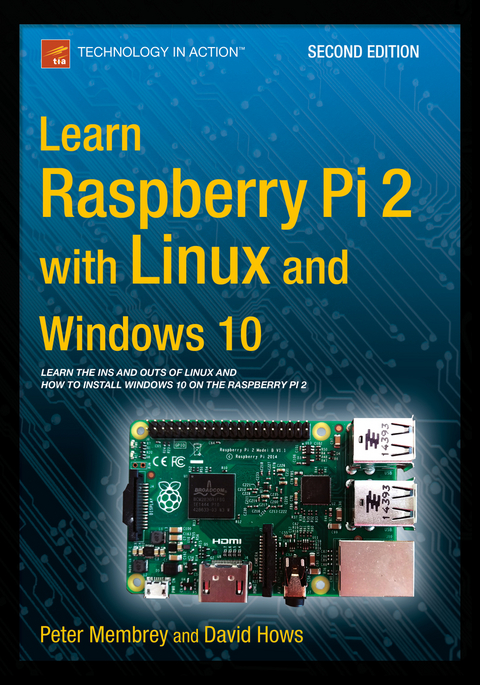
Learn Raspberry Pi 2 with Linux and Windows 10 will tell you everything you need to know about working with Raspberry Pi 2 so you can get started doing amazing things. You'll learn how to set up your new Raspberry Pi 2 with a monitor, keyboard and mouse, and how to install both Linux and Windows on your new Pi 2.
Linux has always been a great fit for the Pi, but it can be a steep learning curve if you've never used it before. With this book, you'll see how easy it is to install Linux and learn how to work with it, including how to become a Linux command line pro. You'll learn that what might seem unfamiliar in Linux is actually very familiar. And now that Raspberry Pi also supports Windows 10, a chapter is devoted to setting up Windows 10 for the Internet of Things on a Raspberry Pi.
Finally, you'll learn how to create these Raspberry Pi projects with Linux:
- Making a Pi web server: run LAMP on your own network
- Making your Pi wireless: remove all the cables and retain all the functionality
- Making a Raspber
Hailing from the U.K., strongPeter Membrey/strong has worked for Red Hat, holds a RHCE certification, and worked and taught at a number of educational institutions since the beginning of his career. He knows what Linux users like and need, and hopes that CentOS will get the kudos it deserves. He lives in Hong Kong and is teaching and consulting on all matters to do with Linux Enterprise networking, while studying for his master's degree.
Learn Raspberry Pi 2 with Linux and Windows 10 will tell you everything you need to know about working with Raspberry Pi 2 so you can get started doing amazing things. You'll learn how to set up your new Raspberry Pi 2 with a monitor, keyboard and mouse, and how to install both Linux and Windows on your new Pi 2.Linux has always been a great fit for the Pi, but it can be a steep learning curve if you've never used it before. With this book, you'll see how easy it is to install Linux and learn how to work with it, including how to become a Linux command line pro. You'll learn that what might seem unfamiliar in Linux is actually very familiar. And now that Raspberry Pi also supports Windows 10, a chapter is devoted to setting up Windows 10 for the Internet of Things on a Raspberry Pi.Finally, you'll learn how to create these Raspberry Pi projects with Linux:Making a Pi web server: run LAMP on your own networkMaking your Pi wireless: remove all the cables and retain all the functionalityMaking a Raspberry Pi-based security cam and messenger serviceMaking a Pi media center: stream videos and music from your Pi
Hailing from the U.K., strongPeter Membrey/strong has worked for Red Hat, holds a RHCE certification, and worked and taught at a number of educational institutions since the beginning of his career. He knows what Linux users like and need, and hopes that CentOS will get the kudos it deserves. He lives in Hong Kong and is teaching and consulting on all matters to do with Linux Enterprise networking, while studying for his master's degree.
1: Your First Bite of Raspberry Pi2: Surveying the Landscape3: Getting Comfortable4: The File-Paths to Success5: Essential Commands6: Editing Files on the Command Line7: Managing Your Pi8: A LAMP of Your Own9: WiPi: Wireless Computing10: The Raspberry sPi11: Pi Media Center12. Installing Windows 10!13. TORAppendix. Doing It by Hand – Writing an SD Card Image
| Erscheint lt. Verlag | 4.10.2015 |
|---|---|
| Zusatzinfo | XXXIII, 296 p. 165 illus. |
| Verlagsort | Berkeley |
| Sprache | englisch |
| Themenwelt | Mathematik / Informatik ► Informatik ► Software Entwicklung |
| Mathematik / Informatik ► Informatik ► Theorie / Studium | |
| Informatik ► Weitere Themen ► Hardware | |
| ISBN-13 | 9781484211625 / 9781484211625 |
| Informationen gemäß Produktsicherheitsverordnung (GPSR) | |
| Haben Sie eine Frage zum Produkt? |
 PDF (Wasserzeichen)
DRM: Digitales Wasserzeichen
Dieses eBook enthält ein digitales Wasserzeichen und ist damit für Sie personalisiert. Bei einer missbräuchlichen Weitergabe des eBooks an Dritte ist eine Rückverfolgung an die Quelle möglich.
Dateiformat: PDF (Portable Document Format)
Mit einem festen Seitenlayout eignet sich die PDF besonders für Fachbücher mit Spalten, Tabellen und Abbildungen. Eine PDF kann auf fast allen Geräten angezeigt werden, ist aber für kleine Displays (Smartphone, eReader) nur eingeschränkt geeignet.
Systemvoraussetzungen:
PC/Mac: Mit einem PC oder Mac können Sie dieses eBook lesen. Sie benötigen dafür einen PDF-Viewer - z.B. den Adobe Reader oder Adobe Digital Editions.
eReader: Dieses eBook kann mit (fast) allen eBook-Readern gelesen werden. Mit dem amazon-Kindle ist es aber nicht kompatibel.
Smartphone/Tablet: Egal ob Apple oder Android, dieses eBook können Sie lesen. Sie benötigen dafür einen PDF-Viewer - z.B. die kostenlose Adobe Digital Editions-App.
Buying eBooks from abroad
For tax law reasons we can sell eBooks just within Germany and Switzerland. Regrettably we cannot fulfill eBook-orders from other countries.
aus dem Bereich