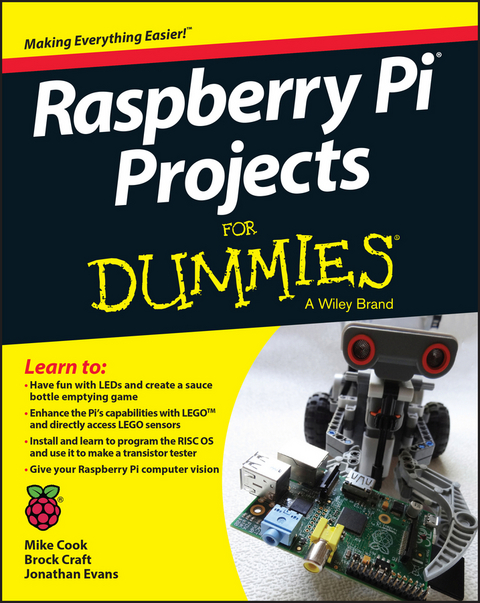
Raspberry Pi Projects For Dummies (eBook)
John Wiley & Sons (Verlag)
978-1-118-76671-2 (ISBN)
Join the Raspberry revolution with these fun and easy Pi projects
The Raspberry Pi has opened up a whole new world of innovation for everyone from hardware hackers and programmers to students, hobbyists, engineers, and beyond, Featuring a variety of hands-on projects, this easy-to-understand guide walks you through every step of the design process and will have you creating like a Raspberry Pi pro in no time, You'll learn how to prepare your workspace, assemble the necessary tools, work with test equipment, and find your way around the Raspberry Pi before moving on to a series of fun, lively projects that brings some power to your plain ol' Pi,
- Introduces Raspberry Pi basics and gives you a solid understanding of all the essentials you'll need to take on your first project
- Includes an array of fun and useful projects that show you how to do everything from creating a magic light wand to enhancing your designs with Lego sensors, installing and writing games for the RISC OS, building a transistor tester, and more
- Provides an easy, hands-on approach to learning more about electronics, programming, and interaction design for Makers and innovators of all ages
Bring the power of Pi to your next cool creation with Raspberry Pi Projects For Dummies!
Mike Cook is a lifelong electronics buff, a former lecturer in physics at Manchester Metropolitan University, and the author of more than 300 articles on computing and electronics, You'll often find him monitoring technology forums under the moniker Grumpy Mike, Brock Craft is a lecturer in creative coding in the Department of Computing at Goldsmiths, University of London, and a senior tutor at the Royal College of Art, He is a specialist in physical computing, data visualization, and the Internet of Things, Jonathan Evans is a distinguished IT professional with more than 20 years of experience, He enjoys sharing his ideas at http://projects,privateeyepi,com, where he continues to explore the endless possibilities of this computing platform,
Join the Raspberry revolution with these fun and easy Pi projects The Raspberry Pi has opened up a whole new world of innovation for everyone from hardware hackers and programmers to students, hobbyists, engineers, and beyond. Featuring a variety of hands-on projects, this easy-to-understand guide walks you through every step of the design process and will have you creating like a Raspberry Pi pro in no time. You ll learn how to prepare your workspace, assemble the necessary tools, work with test equipment, and find your way around the Raspberry Pi before moving on to a series of fun, lively projects that brings some power to your plain ol Pi. Introduces Raspberry Pi basics and gives you a solid understanding of all the essentials you ll need to take on your first project Includes an array of fun and useful projects that show you how to do everything from creating a magic light wand to enhancing your designs with Lego sensors, installing and writing games for the RISC OS, building a transistor tester, and more Provides an easy, hands-on approach to learning more about electronics, programming, and interaction design for Makers and innovators of all ages Bring the power of Pi to your next cool creation with Raspberry Pi Projects For Dummies!
Mike Cook is a lifelong electronics buff, a former lecturer in physics at Manchester Metropolitan University, and the author of more than 300 articles on computing and electronics. You'll often find him monitoring technology forums under the moniker Grumpy Mike. Brock Craft is a lecturer in creative coding in the Department of Computing at Goldsmiths, University of London, and a senior tutor at the Royal College of Art. He is a specialist in physical computing, data visualization, and the Internet of Things. Jonathan Evans is a distinguished IT professional with more than 20 years of experience. He enjoys sharing his ideas at http://projects.privateeyepi.com, where he continues to explore the endless possibilities of this computing platform.
Introduction 1
Part I: Getting Started with Raspberry Pi Projects 5
Chapter 1: Getting to Know the Raspberry Pi 7
Chapter 2: Setting Up Your Tools and Workbench 29
Chapter 3: Focusing on Technique 47
Chapter 4: The Raspberry Family 69
Part II: Working with LEDs and Switches 79
Chapter 5: The Sauce Bottle Game 81
Chapter 6: Stomp! 93
Chapter 7: The Light Fantastic 115
Chapter 8: Games for the Light Fantastic 135
Part III: Developing Advanced Interfaces 155
Chapter 9: Advanced Interfaces 157
Chapter 10: Raspberry Pi in the Sky 197
Chapter 11: Webcam and Computer Vision 233
Chapter 12: The Raspberry Jazz Glitter Trio 263
Part IV: Making the Raspberry Pi Your LEGO's Magic Brick 277
Chapter 13: The Pi Meets LEGO 279
Chapter 14: The LEGO Dice Game 307
Chapter 15: LEGO Direct 335
Part V: Exploring RISC OS 371
Chapter 16: Introducing RISC OS 373
Chapter 17: RISC OS Coding 391
Chapter 18: Transistor Tester 417
Chapter 19: The General-Purpose Input/Output Port in RISC OS 441
Part VI: The Part of Tens 451
Chapter 20: Ten Great LEGO Pi Projects 453
Chapter 21: Ten Suppliers of Components and Tools 457
Index 461
Chapter 1
Getting to Know the Raspberry Pi
In This Chapter
Getting a Raspberry Pi
Finding out what’s possible with your Raspberry Pi
Connecting your Raspberry Pi
Setting up your operating system
Troubleshooting any problems
You probably wouldn’t have picked up this book if you hadn’t already heard about the amazing, low-cost computer for everyone, the Raspberry Pi. Besides being inexpensive, what’s made the Raspberry Pi so appealing is that it’s pretty easy to use. You can even change it to do things its designers never dreamed of. Unlike most consumer electronics, tablets, and desktop computers, the Raspberry Pi is designed to let you investigate how it works and change how it operates by writing your own software programs.
This is all possible because the Raspberry Pi uses an inexpensive but powerful processor and a free operating system, which is based upon the popular Linux platform. In this chapter, we take a look at what you need to get going and show you how to set it up.
We also tell you where to get a Raspberry Pi and the accessories you need to run it. We explain how to set up the operating system, how to connect the hardware, and what to do if you run into any problems along the way. Before long, you’ll be able to make your Raspberry Pi say, “Hello, world!”
Getting a Raspberry Pi
If you’re interested in building projects with a Raspberry Pi, you probably already have one. But if you don’t yet have your own Raspberry Pi, this is the section for you! You’ll be glad to know that there are a few places you can pick one up quickly and cheaply.
The Raspberry Pi comes in several versions: Model A is shown in Figure 1-1, and Model B is shown in Figure 1-2. There are other versions of the Raspberry Pi, though — Chapter 4 has a full rundown. The Model A and Model B use the same kind of processor, but the Model A is cheaper and uses less power; it has a single USB port and connections for your screen and audio. Model B has everything Model A has, plus an additional USB port and an Ethernet port for connecting to a network, so it costs a little more. For the projects in this book, you’ll want to get a Model B.
Photograph courtesy of the Raspberry Pi Foundation
Figure 1-1: Raspberry Pi Model A.
Photograph courtesy of the Raspberry Pi Foundation
Figure 1-2: Raspberry Pi Model B.
The newest model as of this writing is the Raspberry Pi 2 Model B, which replaced the Model B+, but we’ve kept all the projects in this book compatible with Model B and later.
The Raspberry Pi Foundation (which is technically a UK charity, not a business) created the Raspberry Pi. The Raspberry Pi Foundation licenses the manufacture of the Raspberry Pi to the biggest names in electronics in the UK, RS Components (www.rs-components.com) and Farnell, which supports Raspberry Pi under the brand name element14 (www.element14.com/community/community/raspberry-pi). If you’re buying a Raspberry Pi for personal or home use, Farnell’s outlet is CPC (order from http://cpc.farnell.com). In the United States, you can also buy from Newark (www.newark.com), which is a part of Farnell, and Adafruit (www.adafruit.com). These suppliers can provide you with everything you need to get your Raspberry Pi up and going, but you can only buy from them online.
If you simply can’t wait to get your hands on a Raspberry Pi, and you live in the UK, you can also walk in to any Maplin electronics shop, where they’re usually kept in stock. You’ll pay a bit more for the convenience of shopping in a store, but you can get personal advice from the salespeople, which can be pretty useful if you have questions. At the time of this writing, you can walk into a Radio Shack in the United States and buy a Raspberry Pi starter kit, but this may change because the company is restructuring.
You can also find the Raspberry Pi for sale on eBay. There are usually plenty of listings for just a Raspberry Pi or for bundles that include all the accessories you need in order to hook it up.
If you decide to buy a Raspberry Pi on eBay, be sure to purchase from a reputable seller with plenty of good feedback. There are knock-offs out there, and they can’t be guaranteed to be manufactured to the same standards as the real thing. We tend to think the cost savings isn’t worth the risk of buying from eBay.
Discovering What You Can and Can’t Do with a Raspberry Pi
This book shows you how to get going with Raspberry Pi projects. After you’ve done some, you’ll have a pretty good idea of what’s possible. But when you want to go a bit further with your ideas, it’s good to know what you can realistically expect to achieve.
The first thing you see when you get up and running is a text-based prompt on the screen. You can do a lot of things just with text, but most people prefer to launch the familiar graphical user interface (GUI), the desktop environment you’re used to on any other computer. The operating system supports all the things you’d want to do in a desktop system, including playing games, browsing the web, word processing, using spreadsheets, editing photos, and playing audio and video.
But that’s not where the Raspberry Pi really shines. The great things you can do with the Pi come into play when you write your own programs and hook it up to electronics or other objects in the real world using the general-purpose input/output (GPIO) connector. Your Pi is well suited for this because these kinds of things don’t usually require the beefy processor in your desktop or laptop. Using your Pi for things you may not do with your usual computer is what makes it really fun — and that’s what this book is all about!
The Raspberry Pi uses a Broadcom BCM2835 central processing unit (CPU) and a VideoCore IV graphics processing unit (GPU) and shares the onboard memory between them. Either 256MB or 512MB of onboard memory is available. The CPU is an impressive piece of technology that enables fairly complex computing power at an extremely low price. The trade-off is that the Pi is not nearly as powerful as the full-fledged CPU in desktop and laptop computers — it’s a bit slower, roughly comparable to the capabilities of mainstream computers in the ’90s. You shouldn’t plan to do high-performance computing or run heavily graphics-intensive applications like gams or 3D modeling software — the Pi will run these, but they may be unusably slow.
You probably won’t be replacing your main computer with a Pi, but you can do a lot of experimentation with it that you may not try with your desktop or laptop, and you can easily connect your Raspberry Pi to sensors and motors in the real world, which we show you how to do in the projects in this book. And if you make any big mistakes that damage your Pi, it doesn’t cost a lot to get another one and start experimenting again!
Getting Familiar with Your Raspberry Pi
The Raspberry Pi is about the size of a credit card and has all the components that you need onboard so that you can connect it to a TV or display and start using it. These connections are shown in Figure 1-3.
Figure 1-3: Identifying the parts of the Raspberry Pi (in this case, the Model B).
Going clockwise around the board from the top left, you’ll find the following connections:
- General-purpose input/output (GPIO) connector: This is a port for getting electrical signals into and out of your Raspberry Pi, such as for reading sensors and controlling motors. It’s composed of two parallel rows of pins and is labeled P1 (for “Plug 1”). Different models of Raspberry Pi use these pins slightly differently due to the way the pins are routed on the board.
- Composite video output: This jack is used for connecting your Raspberry Pi to a composite video (standard TV) connection using an RCA cable.
- Audio output: This is a black 3.5mm jack on the upper right of the board.
- USB port(s): These ports allow you to connect USB accessories (such as a keyboard and mouse and external storage devices) to your board. The Model A has only one USB port to reduce costs. The Model B has two USB ports.
- Ethernet port (Model B only): This port is for connecting your Raspberry Pi to an Ethernet network and for accessing the Internet.
- Camera serial interface (CSI) connector: This slim black connector between the Ethernet jack and the HDMI output is for connecting a small camera such as a webcam. CSI connectors are available from the Raspberry Pi store.
- HDMI output: This port is used for sending digital video to a computer monitor. The HDMI output also can route your audio, so you may not need to use the audio output port.
- Power input: On the lower-left side is the micro USB power socket. The power is provided via a micro USB power supply that plugs into this port.
- Display serial interface (DSI) connector: In the middle of the left side of the board is a slim...
| Erscheint lt. Verlag | 15.6.2015 |
|---|---|
| Sprache | englisch |
| Themenwelt | Mathematik / Informatik ► Informatik ► Theorie / Studium |
| Informatik ► Weitere Themen ► Hardware | |
| Schlagworte | about raspberry pi • adventures in raspberry pi • book on Raspberry Pi • books on Raspberry Pi • Computer Hardware • computer programming • computer programming with pi • Computer Science • For dummies books • for dummies computer books • getting started Raspberry Pi • getting started with Raspberry Pi • Hardware • Hardware Hacking • how to use Raspberry Pi • Informatik • Raspberry Pi • Raspberry Pi and Processing • Raspberry Pi board • Raspberry Pi circuit board • raspberry pi for dummies • Raspberry PI projects • Raspberry Pi prototype board • Raspberry Pi, raspberry pi projects for dummies • Raspberry Pi tutorials • Raspberry Pi, what is Raspberry Pi, how to use Raspberry Pi, books on Raspberry Pi, dummies guide to Raspberry Pi, beginner guide to Raspberry Pi, getting started with Raspberry Pi, what can Raspberry Pi do, how to get started with Raspberry Pi, interaction design, hardware hacks, hardware hacking • robots and Raspberry Pi • using processing • using Raspberry Pi • what is Raspberry Pi |
| ISBN-10 | 1-118-76671-7 / 1118766717 |
| ISBN-13 | 978-1-118-76671-2 / 9781118766712 |
| Informationen gemäß Produktsicherheitsverordnung (GPSR) | |
| Haben Sie eine Frage zum Produkt? |
 EPUB (Adobe DRM)
Kopierschutz: Adobe-DRM
Adobe-DRM ist ein Kopierschutz, der das eBook vor Mißbrauch schützen soll. Dabei wird das eBook bereits beim Download auf Ihre persönliche Adobe-ID autorisiert. Lesen können Sie das eBook dann nur auf den Geräten, welche ebenfalls auf Ihre Adobe-ID registriert sind.
Details zum Adobe-DRM
Dateiformat: EPUB (Electronic Publication)
EPUB ist ein offener Standard für eBooks und eignet sich besonders zur Darstellung von Belletristik und Sachbüchern. Der Fließtext wird dynamisch an die Display- und Schriftgröße angepasst. Auch für mobile Lesegeräte ist EPUB daher gut geeignet.
Systemvoraussetzungen:
PC/Mac: Mit einem PC oder Mac können Sie dieses eBook lesen. Sie benötigen eine
eReader: Dieses eBook kann mit (fast) allen eBook-Readern gelesen werden. Mit dem amazon-Kindle ist es aber nicht kompatibel.
Smartphone/Tablet: Egal ob Apple oder Android, dieses eBook können Sie lesen. Sie benötigen eine
Geräteliste und zusätzliche Hinweise
Buying eBooks from abroad
For tax law reasons we can sell eBooks just within Germany and Switzerland. Regrettably we cannot fulfill eBook-orders from other countries.
aus dem Bereich