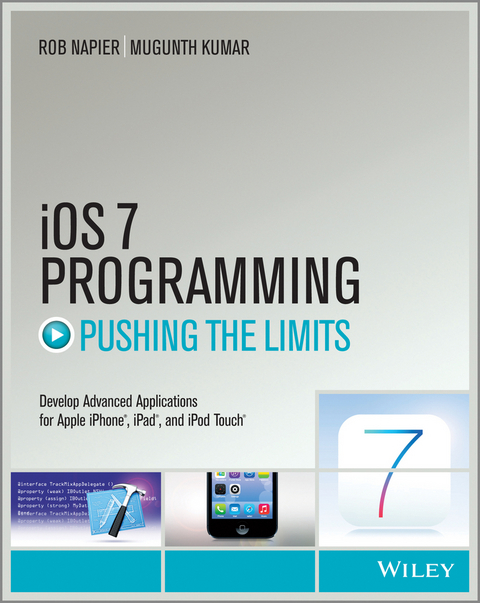
iOS 7 Programming Pushing the Limits (eBook)
John Wiley & Sons (Verlag)
978-1-118-81833-6 (ISBN)
Get ready to create killer apps for iPad and iPhone on the new iOS 7!
With Apple's introduction of iOS 7, demand for developers who know the new iOS will be high. You need in-depth information about the new characteristics and capabilities of iOS 7, and that's what you'll find in this book. If you have experience with C or C++, this guide will show you how to create amazing apps for iPhone, iPad, and iPod touch. You'll also learn to maximize your programs for mobile devices using iPhone SDK 7.0. Advanced topics such as security services, running on multiple iPlatforms, and local networking with Core Bluetooth are also covered.
- Prepares experienced developers to create great apps for the newest version of Apple's iOS
- Thoroughly covers the serious capabilities of iOS 7; information you need in order to make your apps stand out
- Delves into advanced topics including how to control multitasking, security services, running apps on multiple iPlatforms and iDevices, enabling in-app purchases, advanced text layout, and building a core foundation
- Also covers REST, advanced GCD, internationalization and localization, and local networking with Core Bluetooth
iOS 7 Programming: Pushing the Limits will help you develop applications that take full advantage of everything iOS 7 has to offer.
Get ready to create killer apps for iPad and iPhone on the new iOS 7! With Apple's introduction of iOS 7, demand for developers who know the new iOS will be high. You need in-depth information about the new characteristics and capabilities of iOS 7, and that's what you'll find in this book. If you have experience with C or C++, this guide will show you how to create amazing apps for iPhone, iPad, and iPod touch. You'll also learn to maximize your programs for mobile devices using iPhone SDK 7.0. Advanced topics such as security services, running on multiple iPlatforms, and local networking with Core Bluetooth are also covered. Prepares experienced developers to create great apps for the newest version of Apple's iOS Thoroughly covers the serious capabilities of iOS 7; information you need in order to make your apps stand out Delves into advanced topics including how to control multitasking, security services, running apps on multiple iPlatforms and iDevices, enabling in-app purchases, advanced text layout, and building a core foundation Also covers REST, advanced GCD, internationalization and localization, and local networking with Core Bluetooth iOS 7 Programming: Pushing the Limits will help you develop applications that take full advantage of everything iOS 7 has to offer.
Rob Napier (Raleigh, NC)has been developing iPhone applications for as long as there has been an iPhone platform and helped develop the first iPad-only newspaper, The Daily. Rob is Technical Leader for Cisco System's OS X and iOS development team where he works on voice, video and chat clients. He muses on technical topics at Cocoaphony (robnapier.net). Mugunth Kumar (Singapore) has worked as a software design engineer for Honeywell and General Electric, has developed bestselling Appstore apps, and has been quoted and linked by various iOS forums as a go-to source for developer info at blog.mugunthkumar.com.
Introduction 1
Part I What's New? 7
Chapter 1 The Brand New Stuff 9
Chapter 2 The World Is Flat: New UI Paradigms 21
Part II Getting the Most Out of Everyday Tools 33
Chapter 3 You May Not Know 35
Chapter 4 Storyboards and Custom Transitions 47
Chapter 5 Get a Handle on Collection Views 57
Chapter 6 Stay in Bounds with Auto Layout 77
Chapter 7 Better Custom Drawing 91
Chapter 8 Layers Like an Onion: Core Animation 115
Chapter 9 Two Things at Once: Multitasking 137
Part III The Right Tool for the Job 149
Chapter 10 Building a (Core) Foundation 151
Chapter 11 Behind the Scenes: Background Processing 169
Chapter 12 REST for the Weary 187
Chapter 13 Getting More Out of Your Bluetooth Devices 225
Chapter 14 Batten the Hatches with Security Services 239
Chapter 15 Running on Multiple iPlatforms, iDevices, and 64-bit
Architectures 263
Chapter 16 Reach the World: Internationalization and
Localization 283
Chapter 17 Those Pesky Bugs: Debugging 293
Chapter 18 Performance Tuning Until It Flies 315
Part IV Pushing the Limits 333
Chapter 19 Almost Physics: UIKit Dynamics 335
Chapter 20 Fantastic Custom Transitions 353
Chapter 21 Fancy Text Layout 363
Chapter 22 Cocoa's Biggest Trick: Key-Value Coding and
Observing 395
Chapter 23 Beyond Queues: Advanced GCD 409
Chapter 24 Deep Objective-C 425
Summary 447
Further Reading 447
Apple Documentation 447
Other Resources 448
Index 449
Introduction
In some ways, iOS 7 is the most radical change to iOS since the software development kit (SDK) was released in iPhone OS 2. The press and blogosphere have discussed every aspect of the new “flat” user interface and what it means for app developers and users. Suffice to say, no iOS upgrade has required so many developers to redesign their UI so much.
But in other ways, iOS 7 is a nearly seamless transition from iOS 6. Compared to the multitasking changes in iOS 4, iOS 7 may require very little change to your apps, particularly if you have either a very standard UI or a completely custom UI. For those on the extremes, the UI changes are either nearly free or irrelevant.
For all developers, though, iOS brings changes. There are more ways to manage background operations, but the rules for running in the background are even stricter than before. UIKit Dynamics means even more dynamic animations, but they can be challenging to implement well. TextKit brings incredible features to text layout, coupled with maddening limitations and bugs. iOS 7 is a mixed bag, both wonderful and frustrating. But you need to learn it. Users are upgrading quickly.
If you're ready to take on the newest Apple release and push your application to the limits, this book will get you there.
Who This Book Is For
This is not an introductory book. Many other books out there cover Objective-C and walk you step by step through Interface Builder. However, this book assumes that you have a little experience with iOS. Maybe you're self-taught, or maybe you've taken a class. Perhaps you've written at least most of an application, even if you haven't submitted it yet. If you're ready to move beyond the basics, to learn the best practices and the secrets that the authors have gleaned from practical experience writing real applications, this is the book for you.
This book also is not just a list of recipes. It contains plenty of sample code, but the focus is on discovering how to design, code, and maintain great iOS apps. Much of this book is about why rather than just how. You find out as much about design patterns and writing reusable code as about syntax and new frameworks.
What This Book Covers
The iOS platforms always move forward, and so does this book. Most of the examples here require at least iOS 6, and many require iOS 7. All examples use Automatic Reference Counting (ARC), automatic property synthesis, and object literals. Except in a very few places, this book does not cover backward compatibility. If you've been shipping code long enough to need backward compatibility, you probably know how to deal with it. This book is about writing the best possible apps using the best features available.
This book focuses on iPhone 5, iPad 3, and newer models. Most topics here are applicable to other iOS devices. Chapter 15 is devoted to dealing with the differences between the platforms.
What Is New in This Edition
This edition covers most of the newest additions to iOS 7, including the new background operations (Chapter 11), Core Bluetooth (Chapter 13), UIKit Dynamics (Chapter 19), and TextKit (Chapter 21). We provide guidance on how to best deal with the new flat UI (Chapter 2) and have added a chapter of “tips and tricks” you may not be aware of (Chapter 3).
We wanted to keep this book focused on the most valuable information you need for iOS 7. Some chapters from earlier editions have been moved to our website (iosptl.com). There, you can find chapters on common Objective-C practices, Location Services, error handling, and more.
How This Book Is Structured
iOS has a very rich set of tools, from high-level frameworks such as UIKit to very low-level tools such as Core Text. Often, you can achieve a goal in several ways. How do you, as a developer, pick the right tool for the job?
This book separates the everyday from the special purpose, helping you pick the right solution to each problem. You discover why each framework exists, how the frameworks relate to each other, and when to choose one over another. Then you learn how to make the most of each framework for solving its type of problem.
There are four parts to this book, moving from the most common tools to the most powerful. Chapters that are new in this edition or have been extensively updated are indicated.
Part I: What's New?
If you're familiar with iOS 6, this part quickly introduces you to the new features of iOS 7.
- (Updated) Chapter 1: “The Brand New Stuff”—iOS 7 adds a lot of new features, and here you get a quick overview of what's available.
- (New) Chapter 2: “The World Is Flat: New UI Paradigms”—iOS 7 dramatically changes what it means to look and act like an iOS app. In this chapter, you learn the new patterns and design language you need to make the transition.
Part II: Getting the Most Out of Everyday Tools
As an iOS developer, you have encountered a wide variety of common tools, from notifications to table views to animation layers. But are you using these tools to their full potential? In this part, you find the best practices from seasoned developers in Cocoa development.
- (New) Chapter 3: “You May Not Know…”—Even if you're an experienced developer, you may not be familiar with many small parts of Cocoa. This chapter introduces you to best practices refined over years of experience, along with some lesser-known parts of Cocoa.
- (Updated) Chapter 4: “Storyboards and Custom Transitions”—Storyboards can still be confusing and a bit intimidating for developers familiar with nib files. In this chapter, you learn how to use storyboards to your advantage and how to push them beyond the basics.
- (Updated) Chapter 5: “Get a Handle on Collection Views”—Collection views are steadily replacing table views as the preferred layout controller. Even for table-like layouts, collection views offer incredible flexibility that you need to understand to make the most engaging apps. This chapter shows you how to master this important tool.
- (New) Chapter 6: “Stay in Bounds with Auto Layout”—If there was one consistent message from WWDC 2013, it was this: use Auto Layout. There was hardly a UIKit session during the conference that didn't stress this point repeatedly. You may have shied away from Auto Layout due to its many Interface Builder problems in Xcode 4. Xcode 5 has dramatically better support for Auto Layout. Whether you're a constraints convert or longing to return to springs and struts, you should check out what's new in Auto Layout.
- Chapter 7: “Better Custom Drawing”—Custom drawing is intimidating to many new developers, but it's a key part of building beautiful and fast user interfaces. Here, you discover the available drawing options from UIKit to Core Graphics and how to optimize them to look their best while keeping them fast.
- Chapter 8: “Layers Like an Onion: Core Animation”—iOS devices have incredible facilities for animation. With a powerful GPU and the highly optimized Core Animation, you can build engaging, exciting, and intuitive interfaces. In this chapter, you go beyond the basics and discover the secrets of animation.
- (Updated) Chapter 9: “Two Things at Once: Multitasking”—Multitasking is an important part of many applications, and you discover how to do multiple things at once with operations and Grand Central Dispatch.
Part III: The Right Tool for the Job
Some tools are part of nearly every application, and some tools you need only from time to time. In this part, you learn about the tools and techniques that are a little more specialized.
- Chapter 10: “Building a (Core) Foundation”—When you want the most powerful frameworks available on iOS, you're going to want the Core frameworks such as Core Graphics, Core Animation, and Core Text. All of them rely on Core Foundation. In this chapter, you discover how to work Core Foundation data types so you can leverage everything iOS has to offer.
- (Updated) Chapter 11: “Behind the Scenes: Background Processing”—iOS 7 adds a lot more flexibility for background processing, but there are new rules you need to follow to get the most out of the changes. In this chapter, you discover the new NSURLSession and learn how to best implement state restoration.
- Chapter 12: “REST for the Weary”—REST-based services are a mainstay of modern applications, and you learn how to best implement them in iOS.
- (New) Chapter 13: “Getting More Out of Your Bluetooth Devices”—Apple keeps expanding iOS's capability to form ad hoc networks with other devices. This makes it possible to develop entirely new kinds of applications, from better games to micro-location services to easier file sharing. Get up to speed on what's new and jump into whole new markets.
- Chapter 14:...
| Erscheint lt. Verlag | 8.1.2014 |
|---|---|
| Reihe/Serie | Pushing the Limits |
| Sprache | englisch |
| Themenwelt | Informatik ► Weitere Themen ► Smartphones / Tablets |
| Technik ► Elektrotechnik / Energietechnik | |
| Schlagworte | books on iOS 7 programming • books on iOS programming • create apps for iOS 7 • create iOS apps • create iPad apps • create iPhone apps • Drahtlose Kommunikation • Electrical & Electronics Engineering • Elektrotechnik u. Elektronik • iOS 7 programming • iOS7 programming • IOS programming • learn iOS 7 programming • Mobile & Wireless Communications • mobile device programming • programming for iOS 7 |
| ISBN-10 | 1-118-81833-4 / 1118818334 |
| ISBN-13 | 978-1-118-81833-6 / 9781118818336 |
| Informationen gemäß Produktsicherheitsverordnung (GPSR) | |
| Haben Sie eine Frage zum Produkt? |
 PDF (Adobe DRM)
Größe: 11,3 MB
Kopierschutz: Adobe-DRM
Adobe-DRM ist ein Kopierschutz, der das eBook vor Mißbrauch schützen soll. Dabei wird das eBook bereits beim Download auf Ihre persönliche Adobe-ID autorisiert. Lesen können Sie das eBook dann nur auf den Geräten, welche ebenfalls auf Ihre Adobe-ID registriert sind.
Details zum Adobe-DRM
Dateiformat: PDF (Portable Document Format)
Mit einem festen Seitenlayout eignet sich die PDF besonders für Fachbücher mit Spalten, Tabellen und Abbildungen. Eine PDF kann auf fast allen Geräten angezeigt werden, ist aber für kleine Displays (Smartphone, eReader) nur eingeschränkt geeignet.
Systemvoraussetzungen:
PC/Mac: Mit einem PC oder Mac können Sie dieses eBook lesen. Sie benötigen eine
eReader: Dieses eBook kann mit (fast) allen eBook-Readern gelesen werden. Mit dem amazon-Kindle ist es aber nicht kompatibel.
Smartphone/Tablet: Egal ob Apple oder Android, dieses eBook können Sie lesen. Sie benötigen eine
Geräteliste und zusätzliche Hinweise
Zusätzliches Feature: Online Lesen
Dieses eBook können Sie zusätzlich zum Download auch online im Webbrowser lesen.
Buying eBooks from abroad
For tax law reasons we can sell eBooks just within Germany and Switzerland. Regrettably we cannot fulfill eBook-orders from other countries.
 EPUB (Adobe DRM)
Kopierschutz: Adobe-DRM
Adobe-DRM ist ein Kopierschutz, der das eBook vor Mißbrauch schützen soll. Dabei wird das eBook bereits beim Download auf Ihre persönliche Adobe-ID autorisiert. Lesen können Sie das eBook dann nur auf den Geräten, welche ebenfalls auf Ihre Adobe-ID registriert sind.
Details zum Adobe-DRM
Dateiformat: EPUB (Electronic Publication)
EPUB ist ein offener Standard für eBooks und eignet sich besonders zur Darstellung von Belletristik und Sachbüchern. Der Fließtext wird dynamisch an die Display- und Schriftgröße angepasst. Auch für mobile Lesegeräte ist EPUB daher gut geeignet.
Systemvoraussetzungen:
PC/Mac: Mit einem PC oder Mac können Sie dieses eBook lesen. Sie benötigen eine
eReader: Dieses eBook kann mit (fast) allen eBook-Readern gelesen werden. Mit dem amazon-Kindle ist es aber nicht kompatibel.
Smartphone/Tablet: Egal ob Apple oder Android, dieses eBook können Sie lesen. Sie benötigen eine
Geräteliste und zusätzliche Hinweise
Buying eBooks from abroad
For tax law reasons we can sell eBooks just within Germany and Switzerland. Regrettably we cannot fulfill eBook-orders from other countries.
aus dem Bereich