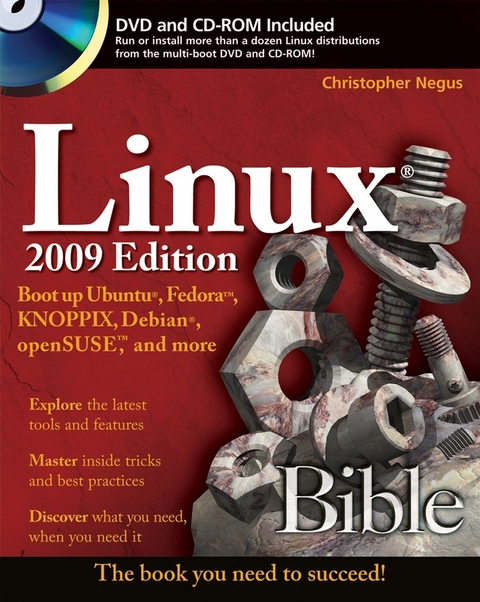
Linux Bible 2009 Edition (eBook)
944 Seiten
John Wiley & Sons (Verlag)
978-0-470-45904-1 (ISBN)
Chris Negus has written or co-written dozens of books onLinux and UNIX, including Red Hat Linux Bible (alleditions), Fedora and Red Hat Enterprise Linux Bible,Linux Troubleshooting Bible, Linux Toys, and LinuxToys II. Last year, Chris co-authored four books for the newToolbox series for power users: Fedora Linux Toolbox,SUSE Linux Toolbox, Ubuntu Linux Toolbox, and BSDUNIX Toolbox.For eight years, Chris worked with the organization at AT&Tthat developed UNIX before moving to Utah to help contribute toNovell's UnixWare project in the early 1990s. When notwriting about Linux, Chris enjoys playing soccer and just hangingout with his family.
Introduction.Part I: Getting off the Ground with Linux.Chapter 1: Starting with Linux.Chapter 2: Linux Projects, Activities, and Careers.Part II: Running a Linux Desktop.Chapter 3: Getting into the Desktop.Chapter 4: Playing Music and Video.Chapter 5: Working with Words and Images.Chapter 6: E-Mailing and Web Browsing.Chapter 7: Gaming with Linux.Part III: Learning System Administration Skills.Chapter 8: Installing Linux.Chapter 9: Running Commands from the Shell.Chapter 10: Learning Basic Administration.Chapter 11: Getting on the Internet.Chapter 12: Securing Linux.Part IV: Setting Up Linux Servers.Chapter 13: Running a Linux, Apache, MySQL, and PHP (LAMP)Server.Chapter 14: Running a Mail Server.Chapter 15: Running a Print Server.Chapter 16: Running a File Server.Part V: Choosing and Installing Different LinuxDistributions.Chapter 17: Running Ubuntu Linux.Chapter 18: Running Fedora and Red Hat Enterprise Linux.Chapter 19: Running Debian GNU/Linux.Chapter 20: Running SUSE and openSUSE Linux.Chapter 21: Running KNOPPIX.Chapter 22: Running Yellow Dog Linux.Chapter 23: Running Gentoo Linux.Chapter 24: Running Slackware Linux.Chapter 25: Running Freespire and Xandros.Chapter 26: Running Mandriva.Chapter 27: Running a Linux Firewall/Router.Chapter 28: Running Bootable Linux Distributions.Part VI: Programming in Linux.Chapter 29: Programming Environments and Interfaces.Chapter 30: Programming Tools and Utilities.Appendix A: Media.Appendix B: Linux History and Background.Index.
| Erscheint lt. Verlag | 28.4.2009 |
|---|---|
| Reihe/Serie | Bible |
| Sprache | englisch |
| Themenwelt | Informatik ► Betriebssysteme / Server ► Unix / Linux |
| Schlagworte | Betriebssysteme / Linux, UNIX • Computer-Ratgeber • End-User Computing • Linux • Operating Systems / Linux & UNIX |
| ISBN-10 | 0-470-45904-2 / 0470459042 |
| ISBN-13 | 978-0-470-45904-1 / 9780470459041 |
| Informationen gemäß Produktsicherheitsverordnung (GPSR) | |
| Haben Sie eine Frage zum Produkt? |
 PDF (Adobe DRM)
Kopierschutz: Adobe-DRM
Adobe-DRM ist ein Kopierschutz, der das eBook vor Mißbrauch schützen soll. Dabei wird das eBook bereits beim Download auf Ihre persönliche Adobe-ID autorisiert. Lesen können Sie das eBook dann nur auf den Geräten, welche ebenfalls auf Ihre Adobe-ID registriert sind.
Details zum Adobe-DRM
Dateiformat: PDF (Portable Document Format)
Mit einem festen Seitenlayout eignet sich die PDF besonders für Fachbücher mit Spalten, Tabellen und Abbildungen. Eine PDF kann auf fast allen Geräten angezeigt werden, ist aber für kleine Displays (Smartphone, eReader) nur eingeschränkt geeignet.
Systemvoraussetzungen:
PC/Mac: Mit einem PC oder Mac können Sie dieses eBook lesen. Sie benötigen eine
eReader: Dieses eBook kann mit (fast) allen eBook-Readern gelesen werden. Mit dem amazon-Kindle ist es aber nicht kompatibel.
Smartphone/Tablet: Egal ob Apple oder Android, dieses eBook können Sie lesen. Sie benötigen eine
Geräteliste und zusätzliche Hinweise
Buying eBooks from abroad
For tax law reasons we can sell eBooks just within Germany and Switzerland. Regrettably we cannot fulfill eBook-orders from other countries.
aus dem Bereich