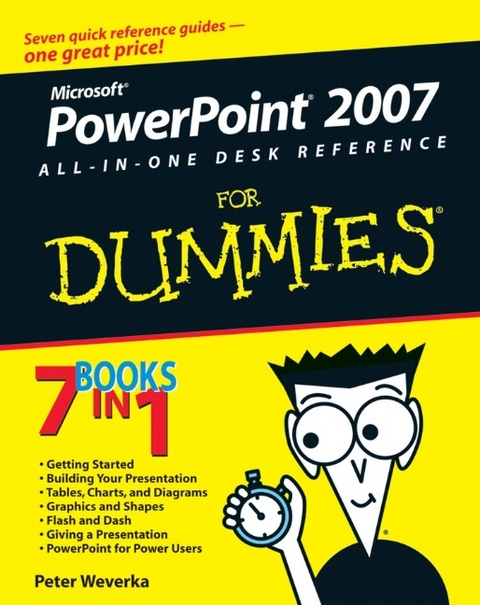
PowerPoint 2007 All-in-One Desk Reference For Dummies (eBook)
646 Seiten
John Wiley & Sons (Verlag)
978-0-470-10754-6 (ISBN)
Your one-stop guide to perfect presentations with PowerPoint2007
Everybody uses PowerPoint, right? How can you make yourpresentations pop? Check this handy reference with its easy-to-useminibooks! Once you get going with all the cool new stuff inPowerPoint 2007, you find out how to jazz up your presentationswith charts, transitions, photos, animation, and even someultra-cool power-user tricks.
Discover how to
* Plan and create a presentation
* Use speed techniques
* Handle master slides and master styles
* Customize slides with themes and templates
* Make diagrams and charts
* Create video slides
Peter Weverka is the bestselling author of several For Dummies books, including Office All-in-One Desk Reference For Dummies and Microsoft Money For Dummies, as well as 30 other computer books about various topics. Peter's humorous articles and stories -- none related to computers, thankfully -- have appeared in Harper's, SPY, The Argonaut, and other magazines for grown-ups.
Introduction.
Book I: Getting Started in PowerPoint.
Chapter 1: Introducing PowerPoint.
Chapter 2: PowerPoint Nuts and Bolts.
Chapter 3: Finding Your Way around the PowerPoint Screen.
Chapter 4: Planning Ahead for a Solid Presentation.
Book II: Building Your Presentation.
Chapter 1: Inserting and Handling Slides.
Chapter 2: Handling Master Slides and Master Styles.
Chapter 3: Handling Slide Backgrounds.
Chapter 4: Entering the Text.
Chapter 5: Formatting Text on a Slide.
Book III: Communicating with Tables, Charts, andDiagrams.
Chapter 1: Constructing the Perfect Table.
Chapter 2: Putting a Chart on a Slide.
Chapter 3: Putting Diagrams on Slides.
Book IV: Embellishing Your Slides with Graphics andShapes.
Chapter 1: Drawing Shapes, Lines, and Other Objects.
Chapter 2: Managing and Manipulating Objects.
Chapter 3: Decorating Slides with Graphics and Photographs.
Chapter 4: Decorating Slides with Clip Art.
Book V: Flash and Dash.
Chapter 1: Taking Advantage of Transitions and Animations.
Chapter 2: Making Video Slides.
Chapter 3: Making Sound and Music a Part of a Presentation.
Book VI: Giving a Presentation.
Chapter 1: Giving an In-Person Presentation.
Chapter 2: Speaker Notes and Handouts.
Chapter 3: Creating a Self-Running Presentation.
Chapter 4: Creating a User-Run Presentation.
Chapter 5: Alternative Ways to Distribute Presentations.
Book VII: PowerPoint for Power Users.
Chapter 1: Customizing PowerPoint.
Chapter 2: Creating a Presentation Design for Your Company.
Chapter 3: Collaborating with Others on a Presentation.
Chapter 4: Linking and Embedding for Compound Presentations.
Chapter 5: Automating Tasks with Macros.
Index.
| Erscheint lt. Verlag | 22.6.2007 |
|---|---|
| Sprache | englisch |
| Themenwelt | Mathematik / Informatik ► Informatik ► Office Programme |
| Schlagworte | Computer-Ratgeber • End-User Computing • Microsoft PowerPoint • PowerPoint 2007 |
| ISBN-10 | 0-470-10754-5 / 0470107545 |
| ISBN-13 | 978-0-470-10754-6 / 9780470107546 |
| Informationen gemäß Produktsicherheitsverordnung (GPSR) | |
| Haben Sie eine Frage zum Produkt? |
 PDF (Adobe DRM)
Kopierschutz: Adobe-DRM
Adobe-DRM ist ein Kopierschutz, der das eBook vor Mißbrauch schützen soll. Dabei wird das eBook bereits beim Download auf Ihre persönliche Adobe-ID autorisiert. Lesen können Sie das eBook dann nur auf den Geräten, welche ebenfalls auf Ihre Adobe-ID registriert sind.
Details zum Adobe-DRM
Dateiformat: PDF (Portable Document Format)
Mit einem festen Seitenlayout eignet sich die PDF besonders für Fachbücher mit Spalten, Tabellen und Abbildungen. Eine PDF kann auf fast allen Geräten angezeigt werden, ist aber für kleine Displays (Smartphone, eReader) nur eingeschränkt geeignet.
Systemvoraussetzungen:
PC/Mac: Mit einem PC oder Mac können Sie dieses eBook lesen. Sie benötigen eine
eReader: Dieses eBook kann mit (fast) allen eBook-Readern gelesen werden. Mit dem amazon-Kindle ist es aber nicht kompatibel.
Smartphone/Tablet: Egal ob Apple oder Android, dieses eBook können Sie lesen. Sie benötigen eine
Geräteliste und zusätzliche Hinweise
Buying eBooks from abroad
For tax law reasons we can sell eBooks just within Germany and Switzerland. Regrettably we cannot fulfill eBook-orders from other countries.
aus dem Bereich