


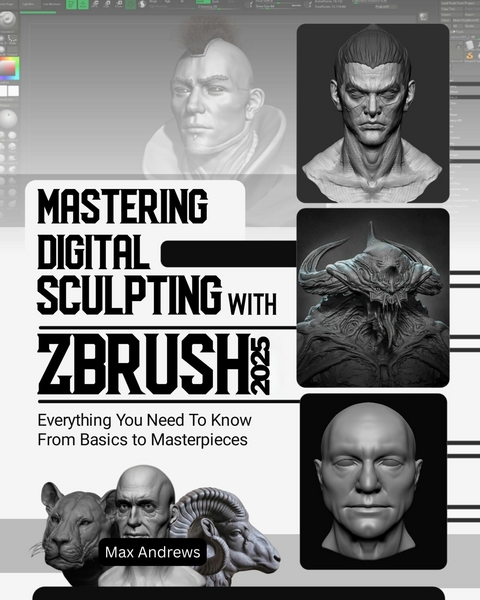
Mastering Digital Sculpting with ZBrush 2025 (eBook)
281 Seiten
J&T (Verlag)
9780000820891 (ISBN)
Master 3D Modeling with ZBrush - The Ultimate Guide for Beginners and Experts
Are you ready to unlock your creative potential and dive into the world of 3D modeling? Whether you're new to 3D art or looking to level up your skills, this complete ZBrush guide is exactly what you need to get started. Say goodbye to confusion and overwhelm - we'll walk you through each step with easy-to-follow instructions and practical tips that will have you creating stunning 3D models in no time.
In this book, you'll explore everything from setting up ZBrush to mastering its powerful tools. You'll learn how to navigate the interface, experiment with materials and colors, and bring your models to life with dynamic poses. This guide is designed to help beginners quickly get up to speed, but even experienced 3D artists will find advanced techniques and tips to elevate their work. Whether you want to create realistic characters or stunning environments, this book has got you covered.
What you'll learn:
✓ A Complete Overview of ZBrush: Discover the history and evolution of ZBrush, and understand its crucial role in digital art creation.
✓ ZBrush in the Entertainment Industry: Learn how ZBrush is used in film, games, and animation to create stunning visuals.
✓ ZBrush 2025 Features & Updates: Dive into the latest features and tools available in the 2025 version of ZBrush to enhance your workflow.
✓ System Setup: Easy-to-follow steps for installation and configuration of ZBrush 2025 on your system, including checking system requirements.
✓ Master the Interface: Navigate through panels, palettes, and controls with ease while customizing your workspace for maximum efficiency.
✓ Brushes and Modes: Explore ZBrush's powerful brushes and brush modes, and learn how to use them to create intricate details in your models.
✓ Customizing the User Interface: Learn how to customize the ZBrush interface to suit your personal workflow, making it easier to work on complex projects.
✓ Advanced Sculpting Techniques: Discover advanced sculpting techniques for more realistic and detailed models, with expert tips on improving your craft.
✓ Using Layers and Subtools: Learn how to work with layers and subtools to create complex, multi-dimensional models without losing control.
✓ Exporting Models for Rendering: Tips on how to export your models for rendering and optimizing them for different formats.
✓ Optimizing Your Workflow: Learn how to streamline your workflow with ZBrush's powerful tools, saving time and making your creative process more efficient.
✓ Troubleshooting Guides: Quick solutions to common issues, ensuring a smooth experience while working with ZBrush.
Start your 3D art journey today and take your skills to new heights with ZBrush!
No matter if you're a beginner or an experienced artist, this guide is your key to mastering 3D modeling. Why wait? Dive into the world of ZBrush and start creating breathtaking 3D art now!
- Insert-IMM: This folder has different IMM brushes that you can use to add geometry. These brushes can be used to make simple shapes or more complicated models like dragon bones or train parts. Some of these brushes can be useful tools.
- Scales: You can use these brushes to give animals like snakes, fish, and even dragon scales.
- Smooth: You can use these brushes to make your mesh smooth in a certain way. Because of how they are made, these brushes can only change some parts of the picture and leave the rest alone. For instance, the smooth peaks brush makes convex forms smooth while keeping cracks sharp. This makes a unique effect that can be used for some surface effects.
- ClayBuildup: This is great for general sculpting, and it's easy to add or take away. This brush can do a lot.
- CurveMultiTube: This tool is great for quickly adding structures in the shape of tubes to a model.
- CurveStrapSnap: This is the best way to add belts or other similar items that wrap around a model.
- DamStandard: Make sharp edges or cuts (this brush is another must-have for sculpting).
- HPolish: This tool can even out an uneven surface and make edges sharper.
- IMM Primitives: This lets you add primitive shapes. This is a quick and easy way to add shapes for a variety of uses.
- Inflate: This function can be used to make objects bigger and shapes bigger. As we already talked about, this brush is also great for fixing thin DynaMesh meshes.
- Move: Great for changing big parts of the shape without changing the fine details on the surface.
- Smooth: The Smooth brush is one of the most important ones because it lets you get rid of details or forms that you don't want in meshes.
- Standard: This brush is great for making smaller changes and is especially good for making shapes and details look better.
- TrimDynamic: This feature lets you quickly cut off shapes that stick out sharply. It's great for making things that have many flat surfaces or pieces that have been chipped off, like rocks or metal that has been damaged.
- MoveTopological: This moves the surface you put it on, and the area it affects isn't just the area close to the brush stroke. The following image shows the beginning of a sub tool that has two spheres: 2 is the regular Move brush, which is used on the left sphere but also affects the right sphere because it has a large brush radius; and 3 is the MoveTopological brush, which moves the mesh based on the continuous mesh surface instead of just the distance from the brush stroke to the mesh:
- ZModeler: This brush lets you do poly modeling on your shapes, which makes it great for making flat, non-living things like outfits, accessories, and costumes.
- Dots: When this mode is used, the chosen Alpha is applied very quickly, many times along a brush stroke. For a round Alpha, this makes a line that goes on forever:
- DragRect: This mode lets you apply the Alpha once when you click on the shape, and you can also change its size.
- FreeHand: This mode lets you draw on the surface and works like the Dots mode but uses Alphas at a high frequency.
- Spray: This brush changes the size, placement, and strength of the Alpha that was chosen as it moves across the mesh. You can change those settings to decide how strong the effect is.
- DragDot: Just like the DragRect mode, the DragDot mode will use a single copy of the Alpha for each stroke. The Alpha, on the other hand, can be moved across the mesh and put anywhere you want, unlike DragRect. You can't change the Alpha's size once you start drawing; it's based on the draw size.
| Erscheint lt. Verlag | 1.6.2025 |
|---|---|
| Sprache | englisch |
| Themenwelt | Kunst / Musik / Theater ► Malerei / Plastik |
| ISBN-13 | 9780000820891 / 9780000820891 |
| Informationen gemäß Produktsicherheitsverordnung (GPSR) | |
| Haben Sie eine Frage zum Produkt? |
 EPUB (Adobe DRM)
Größe: 53,6 MB
Kopierschutz: Adobe-DRM
Adobe-DRM ist ein Kopierschutz, der das eBook vor Mißbrauch schützen soll. Dabei wird das eBook bereits beim Download auf Ihre persönliche Adobe-ID autorisiert. Lesen können Sie das eBook dann nur auf den Geräten, welche ebenfalls auf Ihre Adobe-ID registriert sind.
Details zum Adobe-DRM
Dateiformat: EPUB (Electronic Publication)
EPUB ist ein offener Standard für eBooks und eignet sich besonders zur Darstellung von Belletristik und Sachbüchern. Der Fließtext wird dynamisch an die Display- und Schriftgröße angepasst. Auch für mobile Lesegeräte ist EPUB daher gut geeignet.
Systemvoraussetzungen:
PC/Mac: Mit einem PC oder Mac können Sie dieses eBook lesen. Sie benötigen eine
eReader: Dieses eBook kann mit (fast) allen eBook-Readern gelesen werden. Mit dem amazon-Kindle ist es aber nicht kompatibel.
Smartphone/Tablet: Egal ob Apple oder Android, dieses eBook können Sie lesen. Sie benötigen eine
Geräteliste und zusätzliche Hinweise
Buying eBooks from abroad
For tax law reasons we can sell eBooks just within Germany and Switzerland. Regrettably we cannot fulfill eBook-orders from other countries.
aus dem Bereich


